 C#v14INTERMEDIATE
C# Programming Language
C# cheat sheet with syntax, LINQ, async/await, classes, generics, pattern matching, and .NET best practices with code examples.
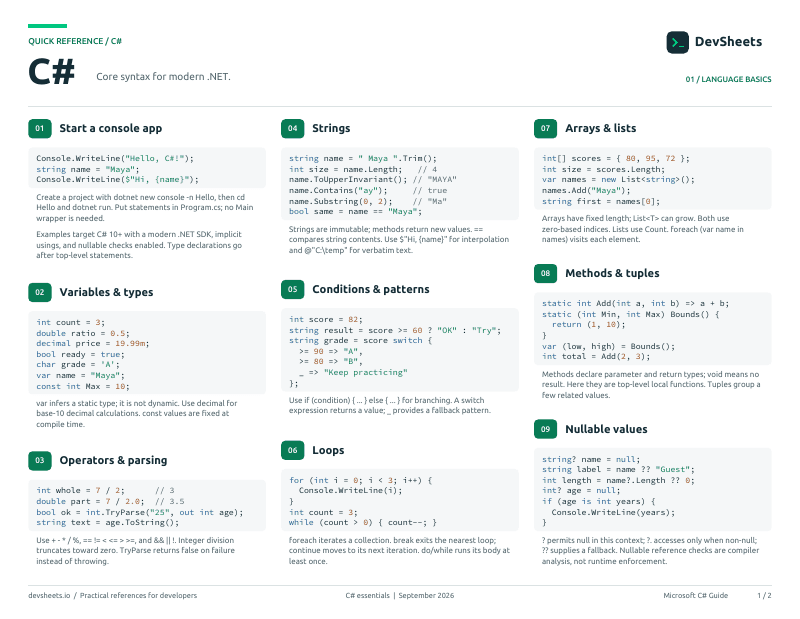
PDF · 2 pages
C# PDF cheat sheet
A two-page C# reference for printing or offline use.
Setup
Install the .NET SDK and create a runnable C# console project.
Install .NET 10, verify the SDK, and run a console application.
# Windows
winget install Microsoft.DotNet.SDK.10

# Ubuntu
sudo apt update
sudo apt install dotnet-sdk-10.0Getting Started
Basic setup and first program
Your first C# program
// Simple console output
Console.WriteLine("Hello, World!");
Console.Write("Same line");
Console.Write(" output");

// Reading input
Console.Write("Enter your name: ");
string name = Console.ReadLine();
Console.WriteLine($"Hello, {name}!");Code documentation
// Single line comment

/* Multi-line
   comment block */

/// <summary>
/// XML documentation comment
/// </summary>

// TODO: Remember to implement this
// HACK: Temporary fix - refactor later
// NOTE: Important informationVariables & Data Types
Basic data types and variable declarations
Common data types
// Numbers
int whole = 42;              // Whole numbers (-2,147,483,648 to 2,147,483,647)
double pi = 3.14;       // Decimals (15-16 digits precision)
float smaller = 3.14f;       // Smaller decimals (6-7 digits)
decimal money = 19.99m;      // Financial calculations (28-29 digits)
long bigNumber = 9000000000L; // Large whole numbers

// Text
string text = "Hello";
char letter = 'A';

// Boolean
bool isTrue = true;
bool isFalse = false;Declaring and initializing variables
// Declaration and initialization
int age = 25;
string name = "John";

// Declaration then assignment
int score;
score = 100;

// Multiple declarations
int x = 1, y = 2, z = 3;

// Type inference with var
var message = "Hello";  // Compiler infers string
var number = 42;        // Compiler infers int
var price = 19.99;      // Compiler infers double

// Constants (cannot change)
const double PI = 3.14159;
const int MAX_SIZE = 100;Control Flow
Conditionals and loops
Conditional execution
// Basic if
if (age >= 18)
{
    Console.WriteLine("Adult");
}

// If-else
if (score >= 90)
{
    Console.WriteLine("A");
}
else if (score >= 80)
{
    Console.WriteLine("B");
}
else
{
    Console.WriteLine("C or below");
}

// Ternary operator
string status = age >= 18 ? "Adult" : "Minor";

// Null checking
if (name != null)
{
    Console.WriteLine(name.Length);
}Iteration and repetition
// For loop
for (int i = 0; i < 5; i++)
{
    Console.WriteLine(i);
}

// While loop
int count = 0;
while (count < 5)
{
    Console.WriteLine(count);
    count++;
}

// Do-while (runs at least once)
do
{
    Console.WriteLine("Run at least once");
} while (false);

// Foreach loop
int[] numbers = { 1, 2, 3, 4, 5 };
foreach (int num in numbers)
{
    Console.WriteLine(num);
}Methods (Functions)
Defining and calling methods
Creating and using methods
// Simple method
void SayHello()
{
    Console.WriteLine("Hello!");
}

// Method with parameters
void Greet(string name)
{
    Console.WriteLine($"Hello, {name}!");
}

// Method with return value
int Add(int a, int b)
{
    return a + b;
}

// Calling methods
SayHello();
Greet("Alice");
int sum = Add(5, 3);Advanced parameter passing
// Pass by value (default)
void ChangeValue(int x)
{
    x = 100;  // Doesn't affect original
}

// Pass by reference
void ChangeRef(ref int x)
{
    x = 100;  // Changes original
}

// Out parameters (must assign)
bool TryParse(string input, out int result)
{
    return int.TryParse(input, out result);
}

// Multiple returns with tuples
(int sum, int product) Calculate(int a, int b)
{
    return (a + b, a * b);
}

// Named arguments
PrintInfo(age: 25, name: "Bob");Object-Oriented Programming
Classes, objects, inheritance, and polymorphism
Defining classes and creating objects
// Simple class
public class Person
{
    public string Name { get; set; }
    public int Age { get; set; }

    public void Introduce()
    {
        Console.WriteLine($"Hi, I'm {Name}");
    }
}

// Usage
Person person = new Person();
person.Name = "Alice";
person.Age = 30;
person.Introduce();Class inheritance and method overriding
// Basic inheritance
public class Animal
{
    public virtual void MakeSound()
    {
        Console.WriteLine("Some sound");
    }
}

public class Dog : Animal
{
    public override void MakeSound()
    {
        Console.WriteLine("Woof!");
    }
}

// Usage
Animal myPet = new Dog();
myPet.MakeSound(); // "Woof!"Collections and Generics
Working with collections and generic types
List, Dictionary, and other generic collections
// List<T>
List<string> names = new List<string> { "Alice", "Bob" };
names.Add("Charlie");

// Dictionary<TKey, TValue>
Dictionary<string, int> ages = new Dictionary<string, int>();
ages["Alice"] = 30;
ages["Bob"] = 25;

// Array
int[] numbers = { 1, 2, 3, 4, 5 };

// HashSet<T>
HashSet<int> uniqueNumbers = new HashSet<int> { 1, 2, 3 };LINQ and Lambda Expressions
Language Integrated Query and functional programming
Querying collections with LINQ
// Query syntax
var adults = from p in people
             where p.Age >= 18
             select p;

// Method syntax
var adults2 = people.Where(p => p.Age >= 18);

// Common operations
var names = people.Select(p => p.Name);
var sorted = people.OrderBy(p => p.Age);
var first = people.First();Async/Await and Tasks
Asynchronous programming patterns
Asynchronous methods and Task handling
// Async method
public async Task<string> GetDataAsync()
{
    await Task.Delay(1000);
    return "Data";
}

// Using async method
string result = await GetDataAsync();

// Multiple async operations
Task<string> task1 = GetDataAsync();
Task<string> task2 = GetDataAsync();
string[] results = await Task.WhenAll(task1, task2);Exception Handling
Error handling and custom exceptions
Basic exception handling patterns
// Basic try-catch
try
{
    int result = 10 / 0;
}
catch (DivideByZeroException ex)
{
    Console.WriteLine($"Error: {ex.Message}");
}
finally
{
    Console.WriteLine("Cleanup");
}Interfaces and Abstract Classes
Contracts and abstract implementations
Creating and implementing interfaces
// Simple interface
public interface IPlayable
{
    void Play();
    void Pause();
}

public class Video : IPlayable
{
    public void Play() => Console.WriteLine("Playing video");
    public void Pause() => Console.WriteLine("Pausing video");
}Delegates and Events
Function pointers and event-driven programming
Working with delegates and built-in delegate types
// Delegate declaration
public delegate void MyDelegate(string message);

// Using delegates
MyDelegate handler = Method1;
handler += Method2; // Multicast
handler("Hello");

// Built-in delegates
Action<string> logger = Console.WriteLine;
Func<int, int, int> add = (x, y) => x + y;
Predicate<int> isEven = n => n % 2 == 0;Properties and Indexers
Advanced property patterns and indexers
Auto-properties, computed properties, and validation
// Auto-properties
public string Name { get; set; }
public int Age { get; private set; }

// Read-only property
public string Id { get; } = Guid.NewGuid().ToString();

// Computed property
public string FullName => $"{FirstName} {LastName}";

// Property with validation
private int _age;
public int Age
{
    get => _age;
    set => _age = value >= 0 ? value : 0;
}Extension Methods and Nullable Types
Extending existing types and handling null values
Adding methods to existing types
// Extension method
public static class StringExtensions
{
    public static bool IsValidEmail(this string email)
    {
        return email?.Contains("@") ?? false;
    }
}

// Usage
string email = "test@example.com";
bool valid = email.IsValidEmail();

// Nullable types
int? nullableInt = null;
string? nullableString = null;

// Null operators
int value = nullableInt ?? 0; // Null coalescing
string length = nullableString?.Length.ToString() ?? "0";Attributes and Reflection
Metadata and runtime type inspection
Using and creating attributes for metadata
// Built-in attributes
[Obsolete("Use NewMethod instead")]
public void OldMethod() { }

[Serializable]
public class MyClass { }

// Custom attribute
[AttributeUsage(AttributeTargets.Property)]
public class RequiredAttribute : Attribute { }

// Using custom attribute
public class User
{
    [Required]
    public string Name { get; set; }
}Pattern Matching
Advanced pattern matching and switch expressions
Modern pattern matching with switch expressions
// Switch expression
string result = number switch
{
    1 => "One",
    2 => "Two",
    < 0 => "Negative",
    > 100 => "Large",
    _ => "Other"
};

// Property patterns
string description = person switch
{
    { Age: < 18 } => "Minor",
    { Age: >= 65 } => "Senior",
    _ => "Adult"
};

// Type patterns
object obj = GetValue();
string type = obj switch
{
    int i => $"Integer: {i}",
    string s => $"String: {s}",
    null => "Null",
    _ => "Unknown"
};Records and Value Types
Modern data types and value semantics
Immutable reference types with value semantics
// Record declaration
public record Person(string Name, int Age);

// Using records
var person = new Person("Alice", 30);
var older = person with { Age = 31 };

// Struct
public struct Point
{
    public double X { get; init; }
    public double Y { get; init; }
}

// Value equality
var p1 = new Person("Bob", 25);
var p2 = new Person("Bob", 25);
bool equal = p1 == p2; // trueMemory Management
Memory optimization and performance considerations
Resource management and deterministic cleanup
// Using statement
using var file = File.OpenRead("data.txt");
// Automatically disposed at end of scope

// IDisposable pattern
public class Resource : IDisposable
{
    public void Dispose()
    {
        // Cleanup
        GC.SuppressFinalize(this);
    }
}

// Span<T> for efficient memory
Span<int> numbers = stackalloc int[100];

// Memory<T> for async scenarios
Memory<byte> buffer = new byte[1024];Latest C# Features
Modern C# features and syntax improvements
Latest language enhancements and syntax improvements
// Global using (C# 10)
global using System;
global using System.Collections.Generic;

// File-scoped namespace (C# 10)
namespace MyApp.Services;

// Raw string literals (C# 11)
string json = """
{
    "name": "John",
    "age": 30
}
""";

// Required members (C# 11)
public class Person
{
    public required string Name { get; init; }
}

// Collection expressions (C# 12)
int[] numbers = [1, 2, 3, 4, 5];