 TypeScriptv7INTERMEDIATE
TypeScript
TypeScript cheat sheet covering types, interfaces, generics, utility types, type guards, and advanced type system features with examples.
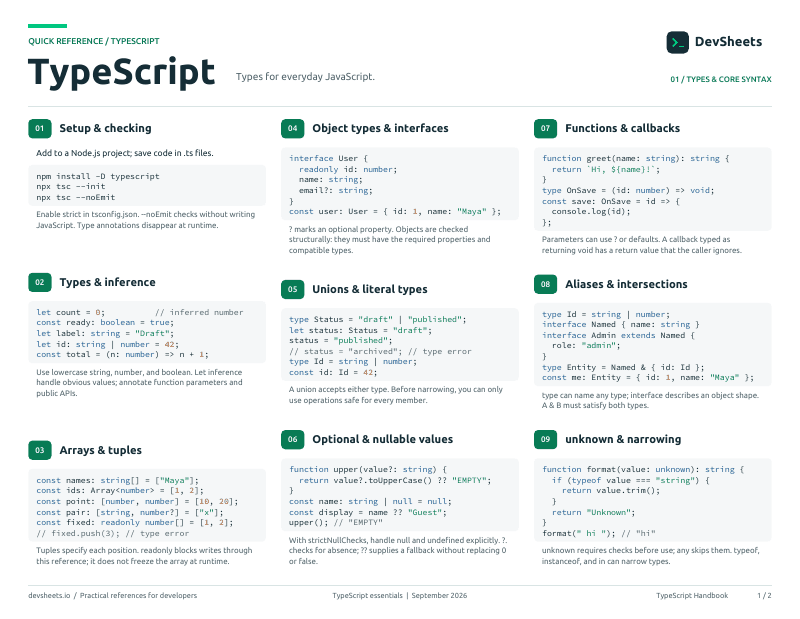
PDF · 2 pages
TypeScript PDF cheat sheet
A two-page TypeScript reference for printing or offline use.
Setup
Install TypeScript in a Node.js project and create a compiler configuration.
Add the compiler as a project dependency, verify it, and initialize tsconfig.
# Requires Node.js and npm
npm init -y
npm install --save-dev typescript
npx tsc --versionBasic Types
TypeScript basic primitive types and type annotations
// Basic types
let name: string = "John"
let age: number = 30
let isActive: boolean = true
let value: any = "anything"
let id: symbol = Symbol("id")
let big: bigint = 100n

// Arrays
let numbers: number[] = [1, 2, 3]
let names: Array<string> = ["Alice", "Bob"]

// Tuple
let tuple: [string, number] = ["hello", 10]

// Enum
enum Color { Red, Green, Blue }
let color: Color = Color.GreenCreate custom types with aliases, combine with unions and intersections
// Type alias
type ID = string | number;

// Union (one of)
type Status = "active" | "inactive" | "pending";

// Intersection (combine all)
type Employee = Person & { company: string };Named constants with numeric or string values
enum Direction {
  Up,       // 0
  Down,     // 1
  Left,     // 2
  Right,    // 3
}

enum Status {
  Active = "ACTIVE",
  Inactive = "INACTIVE",
}

const dir: Direction = Direction.Up;Fixed-length typed arrays and immutable modifiers
// Tuple — fixed length, typed positions
const coord: [number, number] = [10, 20];
const entry: [string, number] = ["age", 30];

// Readonly — prevents mutation
const point: readonly [number, number] = [10, 20];
const names: readonly string[] = ["Alice", "Bob"];Functions
Type annotations for functions and their parameters
// Function declaration
function add(a: number, b: number): number {
  return a + b
}

// Arrow function
const multiply = (a: number, b: number): number => a * b

// Function type
type MathFn = (a: number, b: number) => number
const subtract: MathFn = (a, b) => a - b

// Optional parameters
function greet(name: string, title?: string): string {
  return title ? `${title} ${name}` : `Hello ${name}`
}

// Default parameters
function log(message: string, level: string = "info"): void {
  console.log(`[${level}] ${message}`)
}Define multiple function signatures for different parameter types
// Function overloading
function create(name: string): string
function create(age: number): number
function create(value: string | number): string | number {
  if (typeof value === "string") {
    return `Name: ${value}`
  }
  return value * 2
}

// Method overloading in class
class Calculator {
  add(a: number, b: number): number
  add(a: string, b: string): string
  add(a: any, b: any): any {
    return a + b
  }
}Interfaces & Classes
Define object shapes and contracts for type checking
// Basic interface
interface User {
  name: string
  age: number
  email?: string  // Optional
  readonly id: number  // Readonly
}

// Extending interfaces
interface Admin extends User {
  role: string
  permissions: string[]
}

// Function in interface
interface Greetable {
  name: string
  greet(): void
}

// Index signatures
interface StringDictionary {
  [key: string]: string
}Object-oriented programming with TypeScript classes
// Basic class
class Person {
  name: string
  age: number

  constructor(name: string, age: number) {
    this.name = name
    this.age = age
  }

  greet(): string {
    return `Hello, I'm ${this.name}`
  }
}

// Access modifiers
class Employee {
  public name: string
  private salary: number
  protected department: string
  readonly id: number

  constructor(name: string, salary: number) {
    this.name = name
    this.salary = salary
    this.id = Math.random()
  }
}Class inheritance and method overriding in TypeScript
// Basic inheritance
class Animal {
  name: string

  constructor(name: string) {
    this.name = name
  }

  move(distance: number = 0): void {
    console.log(`${this.name} moved ${distance}m`)
  }
}

class Dog extends Animal {
  bark(): void {
    console.log("Woof! Woof!")
  }
}

// Method overriding
class Cat extends Animal {
  move(distance: number = 5): void {
    console.log("Cat prowling...")
    super.move(distance)
  }
}Generics
Create reusable functions that work with multiple types
// Generic function
function identity<T>(value: T): T {
  return value
}

// Using generic function
const num = identity<number>(42)
const str = identity<string>("hello")
const auto = identity(true)  // Type inference

// Generic with arrays
function first<T>(array: T[]): T | undefined {
  return array[0]
}

// Multiple type parameters
function pair<T, U>(first: T, second: U): [T, U] {
  return [first, second]
}Build flexible classes and interfaces with generic types
// Generic class
class Box<T> {
  private value: T

  constructor(value: T) {
    this.value = value
  }

  getValue(): T {
    return this.value
  }

  setValue(value: T): void {
    this.value = value
  }
}

const numberBox = new Box<number>(42)
const stringBox = new Box<string>("hello")

// Generic interface
interface Container<T> {
  value: T
  add(item: T): void
  remove(): T | undefined
}Type Operations
Operators and assertions for querying and transforming types
Tell the compiler about types it cannot infer automatically
// as — assert a type
const input = document.getElementById("name") as HTMLInputElement;

// satisfies — validate without widening
const palette = {
  red: [255, 0, 0],
  green: "#00ff00",
} satisfies Record<string, string | number[]>;

// as const — narrow to literal types
const routes = ["home", "about", "contact"] as const;Query types from existing values and access type properties by key
// keyof — union of all keys
type User = { name: string; age: number };
type UserKey = keyof User; // "name" | "age"

// typeof — get type from a value
const config = { port: 3000, host: "localhost" };
type Config = typeof config; // { port: number; host: string }

// Indexed access — look up a type by key
type Age = User["age"]; // numberAdvanced Types
Built-in generic types for common type transformations
Partial<User>         // all props optional
Required<User>        // all props required
Pick<User, "name" | "email">  // select props
Omit<User, "password">        // exclude props
Record<string, number>        // key-value object
Readonly<User> // all props readonlyAll the ways to narrow types in conditional blocks
// typeof
if (typeof x === "string") { x.toUpperCase(); }

// instanceof
if (err instanceof Error) { err.message; }

// in operator
if ("email" in user) { user.email; }

// Custom type predicate
function isString(x: unknown): x is string {
  return typeof x === "string";
}Transform and construct types programmatically
// Mapped type
type Optional<T> = { [K in keyof T]?: T[K] };

// Conditional type
type IsString<T> = T extends string ? true : false;

// Template literal type
type EventName = `on${Capitalize<"click" | "focus">}`;
// "onClick" | "onFocus"Decorators
Stage 3 decorators for classes, methods, and properties (TypeScript 5+)
Annotate and modify classes and their members with decorator functions
function log(target: any, context: ClassMethodDecoratorContext) {
  return function (...args: any[]) {
    console.log(`Calling ${String(context.name)}`);
    return target.apply(this, args);
  };
}

class Api {
  @log
  getUsers() { return []; }
}Modules & Namespaces
ES6 module syntax for importing and exporting code
// Named exports
export const API_URL = "https://api.example.com"
export function fetchData() { }
export class User { }
export type UserType = { name: string }
export interface UserInterface { }

// Default export
export default class App { }

// Named imports
import { API_URL, fetchData } from "./api"
import type { UserType } from "./types"

// Default import
import App from "./App"

// Namespace import
import * as Utils from "./utils"

// Combined import
import React, { useState, useEffect } from "react"Type declarations for JavaScript libraries and modules
// Ambient declarations (*.d.ts)
declare module "untyped-module" {
  export function doSomething(): void
  export const value: string
}

// Global declarations
declare const VERSION: string
declare function analyticsTrack(event: string): void

// Module declarations
declare module "*.css" {
  const content: { [className: string]: string }
  export default content
}

declare module "*.svg" {
  const content: React.FC<React.SVGProps<SVGSVGElement>>
  export default content
}TSConfig Reference
Complete reference of TypeScript compiler options with descriptions and values
// tsconfig.json
{
  "compilerOptions": {
    // Target & Module
    "target": "ES2020",              // ES5, ES2020, ES2022, ESNext
    "module": "commonjs",            // commonjs, ESNext, node16
    "lib": ["ES2020", "DOM"],        // Standard library types

    // Type Checking
    "strict": true,                  // Enable all strict checks
    "noImplicitAny": true,          // Error on 'any' type
    "strictNullChecks": true,       // Strict null/undefined checks

    // Module Resolution
    "moduleResolution": "bundler",  // bundler, node16, nodenext
    "esModuleInterop": true,        // CommonJS interop
    "resolveJsonModule": true,      // Import JSON files

    // Emit
    "outDir": "./dist",             // Output directory
    "rootDir": "./src",             // Source directory
    "sourceMap": true,              // Generate sourcemaps
    "declaration": true,            // Generate .d.ts files

    // JavaScript
    "allowJs": true,                // Allow .js files
    "checkJs": false,               // Type check .js files

    // Skip Checks
    "skipLibCheck": true,           // Skip .d.ts checking
    "forceConsistentCasingInFileNames": true
  }
}