 CSSBEGINNER
CSS
Complete CSS fundamentals reference covering selectors, box model, typography, colors, positioning, variables, and modern CSS features
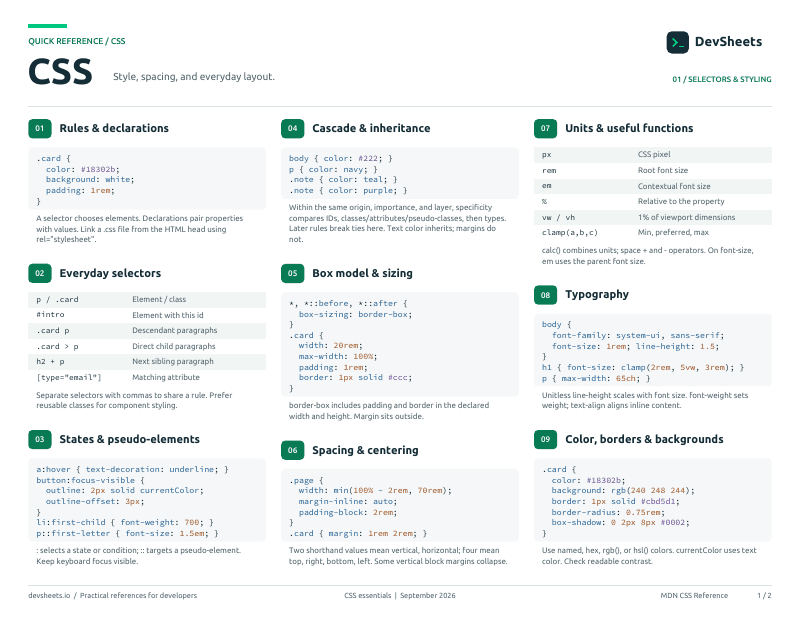
PDF · 2 pages
CSS PDF cheat sheet
A two-page CSS reference for printing or offline use.
Other CSS Sheets
Selectors & Specificity
Target elements with selectors and understand the cascade
All the ways to target HTML elements with CSS
/* Element, class, ID */
p { }
.card { }
#header { }

/* Combinators */
.nav a { }        /* descendant */
.nav > li { }     /* direct child */
h2 + p { }        /* adjacent sibling */
h2 ~ p { }        /* general sibling */

/* Attribute */
[type="email"] { }
[href^="https"] { }How CSS determines which styles win when rules conflict
/* Specificity (low to high):
   Element     → 0-0-1   (p, div, h1)
   Class       → 0-1-0   (.card, :hover, [attr])
   ID          → 1-0-0   (#header)
   Inline      → wins over all
   !important  → overrides everything
*/

/* Cascade order (lowest to highest):
   1. Browser defaults
   2. External/internal stylesheets
   3. Inline styles
   4. !important rules
*/Box Model
How elements are sized with content, padding, border, and margin
Content, padding, border, margin, and how box-sizing changes the calculation
.box {
  width: 300px;
  padding: 20px;
  border: 2px solid #ccc;
  margin: 10px;
}

/* border-box: width INCLUDES padding + border */
*, *::before, *::after {
  box-sizing: border-box;
}Common margin and padding shorthand patterns and spacing techniques
/* Shorthand: Top Right Bottom Left (clockwise) */
margin: 10px 20px 15px 5px;
padding: 1rem 2rem;     /* Vertical | Horizontal */

/* Logical properties (LTR/RTL aware) */
margin-inline: auto;     /* Center horizontally */
padding-block: 1rem; /* Top + bottom */Typography
Font properties, text styling, and web fonts
Font properties, text alignment, spacing, and web font loading
body {
  font-family: system-ui, -apple-system, sans-serif;
  font-size: 16px;
  line-height: 1.6;
  color: #333;
}

h1 { font-size: 2.5rem; font-weight: 700; }
.muted { color: #6b7280; }
.center { text-align: center; }Style ordered/unordered lists, custom markers, and CSS counters
/* Remove default list styles */
ul { list-style: none; padding: 0; }

/* Custom markers */
li::marker { color: #3b82f6; font-size: 1.2em; }
ul { list-style-type: "→ "; }Colors & Backgrounds
Color formats, gradients, and background properties
Color formats, opacity, gradients, and background sizing
/* Color formats */
color: #ff6600;
color: rgb(255, 102, 0);
color: hsl(24, 100%, 50%);
color: oklch(70% 0.2 45);

/* Background */
background: linear-gradient(to right, #3b82f6, #8b5cf6);
background-image: url("bg.jpg");
background-size: cover;Linear, radial, and conic gradients for backgrounds and text
/* Linear gradient */
background: linear-gradient(to right, #3b82f6, #8b5cf6);
background: linear-gradient(135deg, #f59e0b, #ef4444);

/* Radial gradient */
background: radial-gradient(circle, #3b82f6, #1e40af);

/* Conic gradient (pie chart effect) */
background: conic-gradient(red, yellow, lime, aqua, blue, red);Positioning
Control element placement with position, z-index, and stacking
Static, relative, absolute, fixed, and sticky positioning
/* Relative (offset from normal position) */
.badge { position: relative; top: -5px; left: 10px; }

/* Absolute (relative to nearest positioned ancestor) */
.tooltip { position: absolute; top: 100%; left: 0; }

/* Fixed (relative to viewport) */
.navbar { position: fixed; top: 0; width: 100%; z-index: 50; }

/* Sticky (scrolls then sticks) */
.sidebar { position: sticky; top: 20px; }Move, rotate, scale, and skew elements with CSS transforms
transform: translateX(20px);
transform: rotate(45deg);
transform: scale(1.5);
transform: skew(10deg);

/* Combine multiple */
transform: translate(-50%, -50%) rotate(45deg) scale(1.2);Display & Visibility
Control how elements render and whether they are visible
Block, inline, none, visibility, and opacity
display: block;        /* Full width, new line */
display: inline;       /* Flows with text */
display: inline-block; /* Inline but accepts width/height */
display: none;         /* Removed from layout */
display: flex;         /* Flexbox container */
display: grid;         /* Grid container */

visibility: hidden;    /* Hidden but takes up space */
opacity: 0; /* Transparent but interactive */Control mouse cursor appearance and element interactivity
cursor: pointer;         /* Clickable hand */
cursor: not-allowed;     /* Disabled state */
cursor: grab;            /* Draggable */
pointer-events: none;    /* Click-through */
user-select: none; /* Prevent text selection */Borders, Shadows & Effects
Borders, rounded corners, shadows, and visual effects
Border styles, rounded corners, box shadows, and filters
.card {
  border: 1px solid #e5e7eb;
  border-radius: 12px;
  box-shadow: 0 4px 6px rgba(0, 0, 0, 0.1);
}

.circle { border-radius: 50%; }
.pill { border-radius: 9999px; }Accessible focus indicators for keyboard navigation
/* Custom focus ring */
button:focus-visible {
  outline: 2px solid #3b82f6;
  outline-offset: 2px;
}

/* Remove default, add custom */
button:focus { outline: none; }
button:focus-visible {
  box-shadow: 0 0 0 3px rgba(59, 130, 246, 0.4);
}Custom Properties & Functions
CSS variables and built-in math functions
Define reusable values with custom properties and use calc, clamp, min, max
:root {
  --color-primary: #3b82f6;
  --spacing: 1rem;
  --radius: 8px;
}

.btn {
  background: var(--color-primary);
  padding: var(--spacing);
  border-radius: var(--radius);
}

.container {
  width: min(100% - 2rem, 1200px);
}Implement dark mode with CSS variables and media queries
:root {
  --bg: #ffffff;
  --text: #1f2937;
  --primary: #3b82f6;
}

@media (prefers-color-scheme: dark) {
  :root {
    --bg: #111827;
    --text: #f9fafb;
    --primary: #60a5fa;
  }
}

body { background: var(--bg); color: var(--text); }Transitions
Smooth property changes on hover, focus, and state changes
Animate property changes smoothly between states
.btn {
  background: #3b82f6;
  transition: background 200ms ease;
}
.btn:hover {
  background: #2563eb;
}

/* Shorthand: property duration timing-function delay */
transition: all 300ms ease-in-out;
transition: transform 200ms ease, opacity 200ms ease;Media Queries & Responsive
Adapt layouts for different screen sizes and user preferences
Responsive breakpoints, user preferences, and container queries
/* Mobile-first breakpoints */
@media (min-width: 640px)  { /* sm */ }
@media (min-width: 768px)  { /* md */ }
@media (min-width: 1024px) { /* lg */ }
@media (min-width: 1280px) { /* xl */ }

/* Dark mode */
@media (prefers-color-scheme: dark) { }

/* Reduced motion */
@media (prefers-reduced-motion: reduce) { }Style components based on their container size, not the viewport
.card-wrapper {
  container-type: inline-size;
}

@container (min-width: 400px) {
  .card { display: flex; gap: 1rem; }
}

@container (min-width: 600px) {
  .card { font-size: 1.25rem; }
}Modern CSS Features
CSS nesting, :has(), logical properties, and other recent additions
Modern CSS features supported in all major browsers
/* CSS Nesting (no preprocessor needed) */
.card {
  padding: 1rem;
  & h2 { font-size: 1.5rem; }
  &:hover { box-shadow: 0 4px 12px rgba(0,0,0,0.15); }
  & .badge { background: green; }
}

/* :has() parent selector */
.card:has(img) { padding: 0; }Drive @keyframes from scroll position or element visibility — no JS required.
/* Animate as the page scrolls (root scroller) */
@keyframes progress {
  to { width: 100%; }
}
.progress-bar {
  animation: progress linear;
  animation-timeline: scroll();    /* drive from page scroll */
}

/* Animate based on element entering the viewport */
@keyframes fade-in {
  from { opacity: 0; transform: translateY(40px); }
  to   { opacity: 1; transform: translateY(0); }
}
.card {
  animation: fade-in linear both;
  animation-timeline: view();      /* drive from element's own view progress */
  animation-range: entry 0% cover 30%;
}Native animated transitions between DOM states or page navigations.
/* === Same-document transitions (Baseline: all modern browsers) === */
/* JS: trigger a transition */
// document.startViewTransition(() => updateDOM())

/* CSS: opt elements into the named animation */
.card {
  view-transition-name: card;   /* unique per element */
}

/* Customize the auto-generated animation */
::view-transition-old(card),
::view-transition-new(card) {
  animation-duration: 400ms;
}

/* === Cross-document (MPA) view transitions === */
@view-transition {
  navigation: auto;             /* enable on same-origin nav */
}Position elements relative to other elements — no JS-based popper needed.
/* Step 1: name an anchor */
.button {
  anchor-name: --trigger;
}

/* Step 2: position something relative to that anchor */
.tooltip {
  position: absolute;
  position-anchor: --trigger;

  /* Place below the anchor, centered */
  top: anchor(bottom);
  left: anchor(center);
  translate: -50%;
}

/* Or use the high-level shorthand */
.popover {
  position: absolute;
  position-anchor: --trigger;
  position-area: bottom span-all;     /* below, full width */
}