 JavaScriptBEGINNER
JavaScript
JavaScript fundamentals cheat sheet with ES6+ syntax, destructuring, modules, closures, scope, and modern best practices with examples.
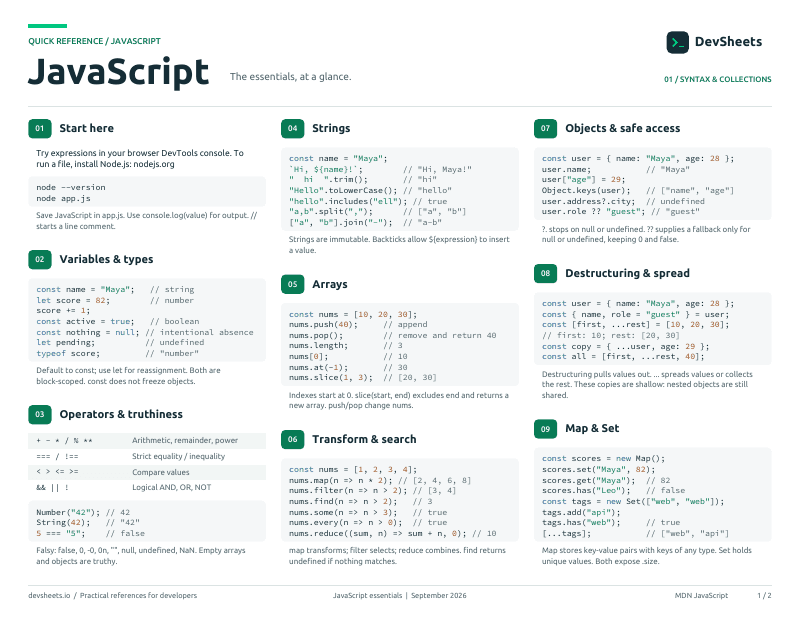
PDF · 2 pages
JavaScript PDF cheat sheet
A two-page JavaScript reference for printing or offline use.
Other JavaScript Sheets
Variables & Data Types
Understanding variables and primitive types
Different ways to declare variables
// const - block-scoped, cannot be reassigned
const name = 'John';

// let - block-scoped, can be reassigned
let age = 30;
age = 31; // OK

// var - function-scoped (avoid in modern JS)
var oldStyle = 'legacy';JavaScript primitive types
// String
const text = 'Hello';
const template = `Value: ${text}`;

// Number (integers and floats)
const integer = 42;
const float = 3.14;

// Boolean
const isActive = true;
const isComplete = false;

// undefined & null
let notDefined; // undefined
const empty = null;

// Symbol & BigInt
const sym = Symbol('id');
const big = 123n; // or BigInt(123)Checking and converting between types
// Type checking
typeof 'text' // 'string'
typeof 42 // 'number'
typeof true // 'boolean'
typeof undefined // 'undefined'
typeof null // 'object' (legacy bug)
typeof {} // 'object'
typeof [] // 'object'
Array.isArray([]) // true

// Type conversion
String(42) // '42'
Number('42') // 42
Boolean(1) // true
parseInt('42px') // 42
parseFloat('3.14') // 3.14Operators
All JavaScript operators
Math and assignment operators
// Arithmetic
let x = 10 + 5; // 15
x = 10 - 5; // 5
x = 10 * 5; // 50
x = 10 / 5; // 2
x = 10 % 3; // 1 (remainder)
x = 2 ** 3; // 8 (exponentiation)

// Assignment operators
x += 5; // x = x + 5
x -= 5; // x = x - 5
x *= 5; // x = x * 5
x /= 5; // x = x / 5
x %= 3; // x = x % 3
x **= 2; // x = x ** 2

// Increment/Decrement
x++; // post-increment
++x; // pre-increment
x--; // post-decrement
--x; // pre-decrementComparing values and logical operations
// Comparison
5 == '5' // true (loose equality)
5 === '5' // false (strict equality)
5 != '5' // false
5 !== '5' // true
5 > 3 // true
5 >= 5 // true
5 < 3 // false
5 <= 5 // true

// Logical
true && false // false (AND)
true || false // true (OR)
!true // false (NOT)

// Short-circuit evaluation
const value = null || 'default'; // 'default'
condition && doSomething();Conditional and other special operators
// Ternary operator
const result = condition ? 'yes' : 'no';

// Optional chaining
const value = obj?.property?.nested;
const result = func?.();

// Nullish coalescing
const value = input ?? 'default';

// Spread operator
const arr = [...array1, ...array2];
const obj = {...obj1, ...obj2};

// Comma operator
let x = (5, 10); // x = 10

// void operator
void functionCall(); // returns undefinedControl Flow
Controlling program execution
if, else, switch statements
// if/else
if (condition) {
  // code
} else if (otherCondition) {
  // code
} else {
  // code
}

// switch
switch (value) {
  case 'a':
    // code
    break;
  case 'b':
    // code
    break;
  default:
    // code
}for, while, do-while, for...of, for...in, break, and continue
for (let i = 0; i < 5; i++) { }
while (condition) { }
for (const item of array) { }    // iterate values
for (const key in object) { } // iterate keysFunctions
Function declarations, expressions, and arrow functions
Three ways to define functions — declarations, expressions, and arrow functions
// Declaration (hoisted)
function greet(name) { return "Hello " + name; }

// Expression (not hoisted)
const greet = function(name) { return "Hello " + name; };

// Arrow function (short syntax, no own "this")
const greet = (name) => "Hello " + name;Function parameters, defaults, rest, spread
// Default parameters
function greet(name = 'Guest') {
  return `Hello, ${name}`;
}

// Rest parameters
function sum(...numbers) {
  return numbers.reduce((a, b) => a + b);
}

// Spread arguments
const nums = [1, 2, 3];
sum(...nums);

// Destructuring parameters
function process({ name, age }) {
  // use name and age
}Understanding scope and closure behavior
// Global scope
let global = 'everywhere';

// Function scope
function outer() {
  let outerVar = 'outer';

  function inner() {
    let innerVar = 'inner';
    console.log(outerVar); // accessible
  }
}

// Closure
function counter() {
  let count = 0;
  return () => ++count;
}Hoisting & Strict Mode
JavaScript hoisting behavior and strict mode
Variable and function hoisting behavior
// Function hoisting
greet(); // Works!
function greet() {
  console.log('Hello');
}

// Variable hoisting
console.log(x); // undefined
var x = 5;

// let/const not hoisted
// console.log(y); // Error
let y = 5;Using strict mode for safer JavaScript
// Enable strict mode
'use strict';

// Prevents accidental globals
// mistypedVariable = 17; // Error

// Prevents duplicate parameters
// function sum(a, a, c) {} // Error

// Makes eval safer
// eval has its own scope in strict modeObjects & Arrays
Working with objects and arrays
Creating and manipulating objects
// Object literal
const person = {
  name: 'John',
  age: 30,
  greet() {
    return `Hello, I'm ${this.name}`;
  }
};

// Accessing properties
person.name; // 'John'
person['age']; // 30

// Adding/modifying
person.email = 'john@example.com';
delete person.age;Creating and manipulating arrays
// Array creation
const arr = [1, 2, 3];
const mixed = [1, 'two', true, null];

// Accessing elements
arr[0]; // 1
arr.at(-1); // 3 (last element)

// Length and modification
arr.length; // 3
arr.push(4); // add to end
arr.pop(); // remove from end
arr.unshift(0); // add to beginning
arr.shift(); // remove from beginningKey-value collections and unique value sets beyond plain objects and arrays
// Map — key-value pairs (any key type)
const map = new Map();
map.set("name", "Alice");
map.get("name");  // "Alice"

// Set — unique values only
const set = new Set([1, 2, 2, 3]);
// Set { 1, 2, 3 }Parse and serialize data with JSON.parse() and JSON.stringify()
// Parse JSON string → object
const data = JSON.parse('{"name":"Alice","age":30}');

// Serialize object → JSON string
const json = JSON.stringify({ name: "Alice", age: 30 });The "this" Keyword
Understanding this binding in different contexts
How this is determined in different contexts
// Global context
console.log(this); // window (browser) or global (Node)

// Object method
const obj = {
  name: 'Object',
  greet() {
    console.log(this.name); // 'Object'
  }
};

// Function context
function regular() {
  console.log(this); // window or undefined (strict)
}

// Arrow functions
const arrow = () => {
  console.log(this); // inherits from parent
};Using call, apply, and bind
// call - invoke with specific this
func.call(thisArg, arg1, arg2);

// apply - invoke with array of args
func.apply(thisArg, [arg1, arg2]);

// bind - create bound function
const bound = func.bind(thisArg);
bound(arg1, arg2);Prototypes & Inheritance
JavaScript prototypal inheritance
Understanding the prototype chain
// Every object has a prototype
const obj = {};
obj.__proto__; // Object.prototype

// Constructor prototype
function Person(name) {
  this.name = name;
}

Person.prototype.greet = function() {
  return `Hello, I'm ${this.name}`;
};

const john = new Person('John');
john.greet(); // method from prototypeImplementing inheritance with prototypes
// Constructor inheritance
function Animal(name) {
  this.name = name;
}

Animal.prototype.speak = function() {
  return `${this.name} makes a sound`;
};

function Dog(name, breed) {
  Animal.call(this, name); // super constructor
  this.breed = breed;
}

// Set up inheritance
Dog.prototype = Object.create(Animal.prototype);
Dog.prototype.constructor = Dog;Classes
ES6 class syntax and inheritance
Creating and using classes
// Class declaration
class Person {
  constructor(name) {
    this.name = name;
  }

  greet() {
    return `Hello, I'm ${this.name}`;
  }
}

const john = new Person('John');
john.greet();Extending classes with inheritance
// Class inheritance
class Animal {
  constructor(name) {
    this.name = name;
  }

  speak() {
    return `${this.name} makes a sound`;
  }
}

class Dog extends Animal {
  constructor(name, breed) {
    super(name); // call parent constructor
    this.breed = breed;
  }

  bark() {
    return 'Woof!';
  }
}Error Handling
Handling errors and exceptions
Handling exceptions with try/catch
// Basic try/catch
try {
  // code that may throw
  riskyOperation();
} catch (error) {
  console.error(error.message);
} finally {
  // always runs
  cleanup();
}Creating and throwing custom errors
// Throwing errors
throw new Error('Something went wrong');

// Custom error class
class ValidationError extends Error {
  constructor(message) {
    super(message);
    this.name = 'ValidationError';
  }
}

throw new ValidationError('Invalid input');Common JavaScript error types
// Common error types
new Error('Generic error');
new TypeError('Wrong type');
new ReferenceError('Not defined');
new SyntaxError('Invalid syntax');
new RangeError('Out of range');
new URIError('URI malformed');
new EvalError('Eval error');Modern JavaScript (ES6+)
Modern JavaScript features
Expand iterables and collect remaining elements with the ... syntax
// Spread — expand into individual elements
const arr = [1, 2, 3];
const copy = [...arr];
const merged = [...arr, 4, 5];
const clone = { ...user, age: 31 };

// Rest — collect remaining elements
const [first, ...rest] = [1, 2, 3, 4];
function sum(...nums) { return nums.reduce((a, b) => a + b); }String templates and tagged templates
// Template literals
const name = 'John';
const greeting = \`Hello, \${name}!\`;

// Multi-line strings
const text = \`Line 1
Line 2
Line 3\`;

// Tagged templates
const styled = css\`color: red;\`;Extracting values from arrays and objects
// Object destructuring
const { name, age } = person;
const { x: newX, y: newY } = point;

// Array destructuring
const [first, second] = array;
const [head, ...tail] = array;

// Function parameters
function greet({ name, age = 18 }) {
  // use name and age
}ES6 module system
// Named exports
export const name = 'John';
export function greet() {}

// Default export
export default class User {}

// Importing
import User from './user.js';
import { name, greet } from './utils.js';
import * as utils from './utils.js';Safe property access and default values
// Optional chaining
const city = user?.address?.city;
const result = obj.method?.();
const item = arr?.[index];

// Nullish coalescing
const value = input ?? 'default';
const port = process.env.PORT ?? 3000;Newer JavaScript features added since 2023: immutable arrays, grouping, structured clone, iterator helpers, and more.
// === Immutable array methods (ES2023) ===
const nums = [3, 1, 2]
nums.toSorted()           // [1, 2, 3]  (nums unchanged)
nums.toReversed()         // [2, 1, 3]
nums.toSpliced(1, 1, 99)  // [3, 99, 2]
nums.with(0, 100)         // [100, 1, 2]

// === Object.groupBy (ES2024) ===
const users = [
  { name: 'Alice', role: 'admin' },
  { name: 'Bob',   role: 'user' },
  { name: 'Carol', role: 'admin' },
]
Object.groupBy(users, u => u.role)
// { admin: [Alice, Carol], user: [Bob] }

// === Promise.withResolvers (ES2024) ===
const { promise, resolve, reject } = Promise.withResolvers()

// === structuredClone (deep clone — almost anything) ===
const copy = structuredClone({ date: new Date(), nested: [1, 2] })

// === Iterator helpers (ES2025) ===
const evens = nums.values().filter(n => n % 2 === 0).take(3).toArray()