 Pythonv3.14INTERMEDIATE
Python
Essential Python reference covering syntax, data structures, functions, OOP, comprehensions, type hints, virtual environments, and the standard library.
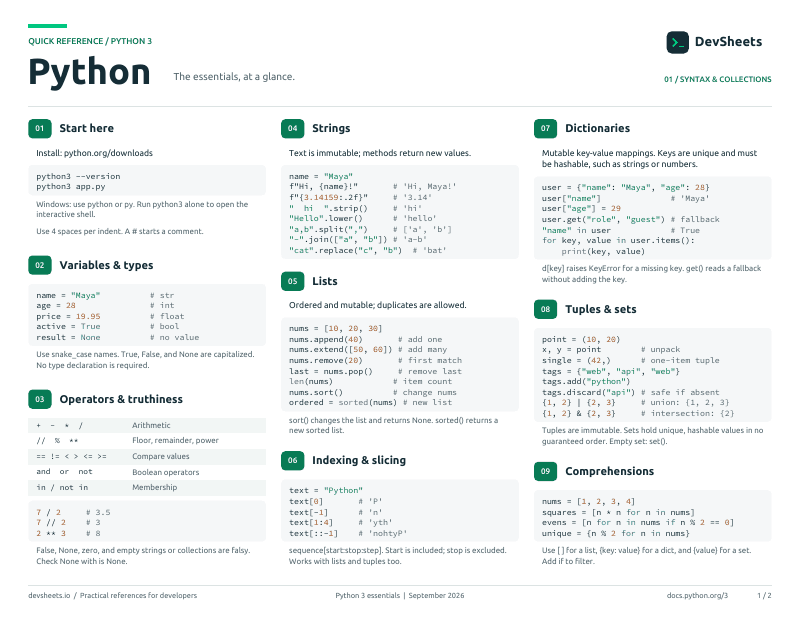
PDF · 2 pages
Python PDF cheat sheet
A two-page Python reference for printing or offline use.
Other Python Sheets
Setup & Basics
Install Python, run scripts, and understand basic syntax.
Install Python and run scripts from the command line.
# Install (macOS)
brew install python

# Install (Ubuntu/Debian)
sudo apt install python3 python3-pip

# Install (Windows) — download from https://python.org/downloads

# Check version
python3 --version

# Run a script
python3 app.py

# Interactive REPL
python3Python variables are dynamically typed — no declaration keyword needed.
# Variables (no declaration keyword)
name = "Alice"
age = 30
price = 19.99
is_active = True

# Check type
type(name)    # <class 'str'>

# Multiple assignment
x, y, z = 1, 2, 3
a = b = c = 0Strings & Formatting
String operations, methods, and formatting with f-strings.
Common string methods and operations.
s = "Hello, World!"
s.lower()          # "hello, world!"
s.upper()          # "HELLO, WORLD!"
s.strip()          # Remove whitespace
s.split(", ")      # ["Hello", "World!"]
s.replace("World", "Python")
s.startswith("Hello")  # True
"World" in s # TrueFormat strings with f-strings, .format(), and % operator.
name = "Alice"
age = 30

# f-strings (Python 3.6+ — preferred)
f"Name: {name}, Age: {age}"
f"Next year: {age + 1}"
f"Price: {19.99:.2f}"

# Debug syntax (3.8+) — prints variable name and value
f"{name=}, {age=}"   # "name='Alice', age=30"

# .format()
"Name: {}, Age: {}".format(name, age)Control Flow
Conditionals, loops, match statements, and flow control keywords.
if/elif/else statements and ternary expressions.
# if / elif / else
if score >= 90:
    grade = "A"
elif score >= 80:
    grade = "B"
else:
    grade = "C"

# Ternary (inline if)
status = "adult" if age >= 18 else "minor"for and while loops with break, continue, and else clauses.
# for loop
for item in items:
    print(item)

# range
for i in range(5):       # 0, 1, 2, 3, 4
    print(i)

# while loop
while count > 0:
    count -= 1

# break / continue
for x in range(10):
    if x == 3: continue  # skip 3
if x == 7: break # stop at 7Structural pattern matching (Python 3.10+).
# Basic match
match command:
    case "quit":
        exit()
    case "hello":
        print("Hi!")
    case _:
print("Unknown")Data Structures
Lists, tuples, dictionaries, and sets — with comprehensions.
Ordered, mutable sequences with powerful methods.
nums = [1, 2, 3, 4, 5]
nums.append(6)          # Add to end
nums.insert(0, 0)       # Insert at index
nums.pop()              # Remove & return last
nums.remove(3)          # Remove first occurrence
nums.sort()             # Sort in place
len(nums)               # Length
nums[1:3] # Slice [2, 3]Key-value mappings with fast lookups.
d = {"name": "Alice", "age": 30}
d["name"]              # "Alice"
d.get("email", "N/A")  # "N/A" (default)
d["email"] = "a@b.com" # Add/update
d.keys()               # dict_keys
d.values()             # dict_values
d.items()              # key-value pairs
del d["age"] # Remove keyImmutable sequences and unique unordered collections.
# Tuples — immutable, ordered
coords = (10, 20)
x, y = coords          # Unpack
single = (42,)          # Single-element tuple needs comma

# Sets — unique, unordered
s = {1, 2, 3}
s.add(4)
s.discard(2)
a & b   # intersection
a | b   # union
a - b # differenceConcise syntax for creating lists, dicts, and sets.
# List comprehension
squares = [x**2 for x in range(10)]
evens = [x for x in nums if x % 2 == 0]

# Dict comprehension
{k: v for k, v in pairs}

# Set comprehension
{x.lower() for x in words}Functions
Define functions with default args, *args, **kwargs, and lambda expressions.
Define functions with parameters, defaults, and return values.
def greet(name, greeting="Hello"):
    """Return a greeting string."""
    return f"{greeting}, {name}!"

result = greet("Alice")
result = greet("Bob", greeting="Hi")Accept variable arguments and unpack iterables into function calls.
# *args — variable positional arguments
def total(*nums):
    return sum(nums)

total(1, 2, 3)  # 6

# **kwargs — variable keyword arguments
def config(**options):
    for k, v in options.items():
        print(f"{k}: {v}")

config(host="localhost", port=5432)Anonymous functions and built-in functions that take functions as arguments.
# Lambda — anonymous inline function
square = lambda x: x ** 2
add = lambda a, b: a + b

# map — apply function to each item
list(map(str.upper, ["a", "b"]))  # ["A", "B"]

# filter — keep items where function returns True
list(filter(lambda x: x > 0, [-1, 0, 1, 2]))

# sorted with key
sorted(users, key=lambda u: u["age"])Type Hints
Add type annotations for better code clarity and tooling support.
Annotate function parameters, return types, and variables.
# Function annotations
def greet(name: str, age: int = 0) -> str:
    return f"Hello {name}, age {age}"

# Variable annotations
count: int = 0
names: list[str] = ["Alice", "Bob"]
config: dict[str, int] = {"port": 8080}Classes & OOP
Classes, inheritance, dataclasses, and special methods.
Define classes with __init__, instance methods, and class/static methods.
class Dog:
    species = "Canine"  # Class variable

    def __init__(self, name, age):
        self.name = name    # Instance variable
        self.age = age

    def bark(self):
        return f"{self.name} says woof!"

rex = Dog("Rex", 5)
rex.bark() # "Rex says woof!"Extend classes with inheritance and use dataclasses for data containers.
# Inheritance
class Animal:
    def __init__(self, name):
        self.name = name
    def speak(self):
        raise NotImplementedError

class Cat(Animal):
    def speak(self):
        return f"{self.name} says meow!"

# Dataclass (3.7+)
from dataclasses import dataclass

@dataclass
class Point:
    x: float
y: floatNamed constants grouped under a single type.
from enum import Enum, auto

class Color(Enum):
    RED = 1
    GREEN = 2
    BLUE = 3

Color.RED            # <Color.RED: 1>
Color.RED.name       # "RED"
Color.RED.value      # 1
Color(1)             # <Color.RED: 1> (lookup by value)
Color["RED"]         # <Color.RED: 1> (lookup by name)

# auto() — assign values automatically
class Status(Enum):
    PENDING = auto()
    ACTIVE = auto()
DONE = auto()Error Handling
Handle exceptions with try/except, raise errors, and define custom exceptions.
Catch and handle exceptions gracefully.
try:
    result = 10 / 0
except ZeroDivisionError:
    print("Cannot divide by zero")
except (TypeError, ValueError) as e:
    print(f"Error: {e}")
else:
    print("Success")        # Only runs if no exception
finally:
print("Always runs") # CleanupFile I/O
Read and write files, work with JSON, and use context managers.
Read, write, and append files. Parse and write JSON data.
# Read a file
with open("data.txt") as f:
    content = f.read()

# Write a file
with open("output.txt", "w") as f:
    f.write("Hello!")

# JSON
import json
data = json.loads('{"name": "Alice"}')
json_str = json.dumps(data, indent=2)Modules & Virtual Environments
Import modules, create packages, and manage dependencies with venv and pip.
Import standard library and custom modules; structure runnable scripts.
import os
from pathlib import Path
from datetime import datetime, timedelta
from collections import defaultdict, Counter
import json

# Alias
import numpy as np

# Import specific names
from math import sqrt, pi

# Script entry point — only runs when invoked directly,
# not when the module is imported
def main():
    print("Running as a script")

if __name__ == "__main__":
main()Isolate project dependencies with venv, pip, or the modern uv toolchain.
# === Modern: uv (Astral) — fastest, all-in-one ===
# Install uv: https://docs.astral.sh/uv/

uv init my-project          # Create new project (pyproject.toml + venv)
cd my-project
uv add requests flask       # Install + lock deps
uv run python app.py        # Run inside the project env
uv sync                     # Install from uv.lock

# === Classic: venv + pip ===
python3 -m venv venv

# Activate
source venv/bin/activate    # macOS / Linux
venv\Scripts\activate       # Windows

pip install requests flask
pip freeze > requirements.txt
pip install -r requirements.txt
deactivateAdvanced Features
Decorators, generators, context managers, and the walrus operator.
Wrap functions to add behavior without modifying the original.
import functools

def timer(func):
    @functools.wraps(func)
    def wrapper(*args, **kwargs):
        import time
        start = time.time()
        result = func(*args, **kwargs)
        print(f"{func.__name__}: {time.time()-start:.2f}s")
        return result
    return wrapper

@timer
def slow_function():
import time; time.sleep(1)Lazy iteration with yield and resource management with "with" statements.
# Generator function
def countdown(n):
    while n > 0:
        yield n
        n -= 1

for num in countdown(5):
    print(num)  # 5, 4, 3, 2, 1

# Context manager
with open("file.txt") as f:
data = f.read()Cooperative concurrency for I/O-bound work (network, files, DBs).
import asyncio

# Define an async function (coroutine)
async def fetch_user(user_id: int) -> dict:
    await asyncio.sleep(1)   # Simulate network call
    return {"id": user_id, "name": "Alice"}

# Run an async function from sync code
async def main():
    user = await fetch_user(1)
    print(user)

asyncio.run(main())

# Run many concurrently
async def fetch_all():
    results = await asyncio.gather(
        fetch_user(1),
        fetch_user(2),
        fetch_user(3),
    )
return resultsStandard Library
Essential modules from the Python standard library.
Most commonly used standard library modules.
from collections import Counter, defaultdict
from datetime import datetime, timedelta
from pathlib import Path
import os, re, math, subprocess

Counter(["a","b","a"]).most_common()
now = datetime.now()
Path("dir").mkdir(exist_ok=True)
subprocess.run(["ls", "-la"], check=True)Structured logging instead of print() for real applications.
import logging

# Basic setup — call once at app start
logging.basicConfig(
    level=logging.INFO,
    format="%(asctime)s [%(levelname)s] %(name)s: %(message)s",
)

log = logging.getLogger(__name__)

log.debug("Detailed diagnostic info")
log.info("Normal event happened")
log.warning("Something looks off")
log.error("Something failed")
log.exception("Failed with traceback") # Inside an except blockBest Practices
Pythonic patterns and performance tips.
Write idiomatic Python code.
# Swap variables
a, b = b, a

# Ternary
x = "yes" if condition else "no"

# Check empty
if not items:   # not len(items) == 0

# EAFP over LBYL
try:
    value = d[key]
except KeyError:
    value = default