 Rustv1.97ADVANCED
Rust
Comprehensive Rust reference covering ownership, borrowing, structs, enums, traits, generics, error handling, async/await, concurrency, macros, and more.
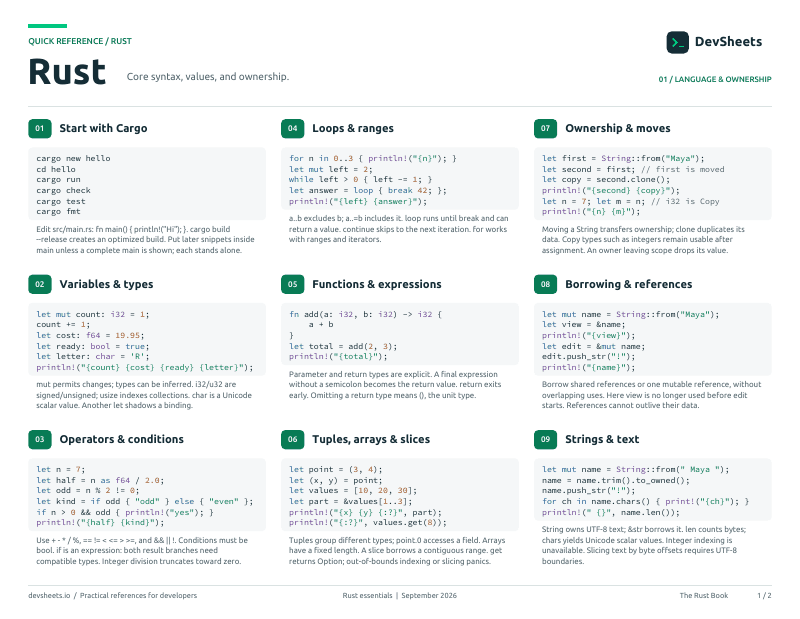
PDF · 2 pages
Rust PDF cheat sheet
A two-page Rust reference for printing or offline use.
Getting Started
Install Rust, create a project with Cargo, and run your first program.
Install Rust with rustup and use Cargo to create and run projects.
# Install Rust
curl --proto '=https' --tlsv1.2 -sSf https://sh.rustup.rs | sh

# Create a new project
cargo new my_project
cd my_project

# Build and run
cargo run

# Hello World — src/main.rs
fn main() {
    println!("Hello, world!");
}Variables & Types
Variables, mutability, basic types, tuples, arrays, and type aliases.
Declare variables with let, control mutability, and use primitive types.
// Immutable by default
let x = 5;
let name = "Alice";

// Mutable
let mut count = 0;
count += 1;

// Type annotations
let age: u32 = 30;
let pi: f64 = 3.14;
let active: bool = true;
let letter: char = 'A';

// Constants
const MAX_SIZE: u32 = 100;Strings
Understand &str vs String, conversions, and string operations.
The two string types, when to use each, and how to convert between them.
// &str — string slice (borrowed, immutable, stack)
let greeting: &str = "hello";

// String — owned, growable, heap-allocated
let mut s = String::from("hello");
s.push_str(", world!");
s.push('!');

// Conversions
let owned: String = "hello".to_string();
let slice: &str = &owned;Control Flow
If expressions, loops, match, if let, and pattern matching.
Conditional expressions, loops, and pattern matching.
// If expression (returns a value)
let status = if age >= 18 { "adult" } else { "minor" };

// Loops
for item in &items { println!("{item}"); }
for i in 0..5 { println!("{i}"); }        // 0,1,2,3,4
while count > 0 { count -= 1; }
let result = loop { break 42; };          // loop returns a value

// Match
match value {
    1 => println!("one"),
    2 | 3 => println!("two or three"),
    4..=9 => println!("four to nine"),
    _ => println!("other"),
}Functions & Closures
Define functions, closures, and understand Fn traits.
Named functions, closures, and the Fn/FnMut/FnOnce traits.
// Function with parameters and return type
fn add(a: i32, b: i32) -> i32 {
    a + b    // No semicolon = return value
}

// Closure — anonymous function
let double = |x: i32| x * 2;
let sum = |a, b| a + b;
let result = double(5);  // 10

// Closure capturing variables
let name = String::from("Alice");
let greet = || println!("Hello, {name}");Ownership & Borrowing
Rust's ownership system, borrowing rules, and Clone vs Copy.
Move semantics, borrowing rules, and the Clone/Copy distinction.
// Ownership — each value has one owner
let s1 = String::from("hello");
let s2 = s1;          // s1 is MOVED to s2, s1 is no longer valid
// println!("{s1}");   // ERROR: value moved

// Clone — explicit deep copy
let s1 = String::from("hello");
let s2 = s1.clone();  // Deep copy, both valid

// Borrowing — references don't take ownership
fn print_len(s: &String) { println!("{}", s.len()); }
print_len(&s2);        // Borrow s2, s2 still valid

// Mutable reference
fn push_world(s: &mut String) { s.push_str(" world"); }Structs & Enums
Define custom types with structs and enums, and attach methods with impl.
Define structs and attach methods with impl blocks.
#[derive(Debug)]
struct User {
    name: String,
    age: u32,
    active: bool,
}

impl User {
    // Associated function (constructor)
    fn new(name: &str, age: u32) -> Self {
        Self { name: name.to_string(), age, active: true }
    }

    // Method (takes &self)
    fn is_adult(&self) -> bool {
        self.age >= 18
    }
}

let user = User::new("Alice", 30);
println!("{:?}", user);Define enums with variants that can hold data.
// Enum with data variants
enum Shape {
    Circle(f64),                    // radius
    Rectangle { width: f64, height: f64 },
    Triangle(f64, f64, f64),        // sides
}

// Use match to handle variants
fn area(shape: &Shape) -> f64 {
    match shape {
        Shape::Circle(r) => std::f64::consts::PI * r * r,
        Shape::Rectangle { width, height } => width * height,
        Shape::Triangle(a, b, c) => { /* ... */ 0.0 }
    }
}Traits
Define shared behavior with traits, derive common traits, and use From/Into.
Create traits, implement them for types, and use trait bounds.
// Define a trait
trait Summary {
    fn summarize(&self) -> String;

    // Default implementation
    fn preview(&self) -> String {
        format!("{}...", &self.summarize()[..20])
    }
}

// Implement for a type
impl Summary for Article {
    fn summarize(&self) -> String {
        format!("{} by {}", self.title, self.author)
    }
}Derive traits automatically and implement From/Into for conversions.
// Derive common traits
#[derive(Debug, Clone, PartialEq, Eq, Hash)]
struct Point { x: i32, y: i32 }

// From/Into — type conversions
impl From<(i32, i32)> for Point {
    fn from((x, y): (i32, i32)) -> Self {
        Point { x, y }
    }
}
let p: Point = (10, 20).into();

// Display — custom printing with {}
impl std::fmt::Display for Point {
    fn fmt(&self, f: &mut std::fmt::Formatter) -> std::fmt::Result {
        write!(f, "({}, {})", self.x, self.y)
    }
}Generics & Lifetimes
Write generic code and annotate lifetimes for references.
Generic functions, structs, and lifetime annotations.
// Generic function
fn largest<T: PartialOrd>(list: &[T]) -> &T {
    let mut max = &list[0];
    for item in list { if item > max { max = item; } }
    max
}

// Generic struct
struct Wrapper<T> { value: T }

// Lifetime annotation — tells Rust how long references live
fn longest<'a>(x: &'a str, y: &'a str) -> &'a str {
    if x.len() > y.len() { x } else { y }
}Error Handling
Handle errors with Result, Option, the ? operator, and custom error types.
Propagate errors idiomatically with Result<T, E> and the ? operator.
// Result<T, E> — success or error
fn parse_port(s: &str) -> Result<u16, std::num::ParseIntError> {
    let port = s.parse::<u16>()?;   // ? returns early on error
    Ok(port)
}

// Handle Result
match parse_port("8080") {
    Ok(port) => println!("Port: {port}"),
    Err(e) => eprintln!("Error: {e}"),
}

// ? chains multiple fallible operations
fn read_config() -> Result<String, std::io::Error> {
    let contents = std::fs::read_to_string("config.toml")?;
    Ok(contents)
}Collections & Iterators
Vec, HashMap, and iterator methods for transforming data.
Dynamic arrays and key-value maps.
// Vec — dynamic array
let mut v = vec![1, 2, 3];
v.push(4);
v.pop();              // Some(4)
let first = &v[0];   // Panics if out of bounds
let first = v.get(0); // Returns Option<&T>

// HashMap
use std::collections::HashMap;
let mut map = HashMap::new();
map.insert("Alice", 30);
map.get("Alice"); // Some(&30)Transform collections with iterator adaptors and consumers.
let nums = vec![1, 2, 3, 4, 5];

// Map, filter, collect
let doubled: Vec<i32> = nums.iter().map(|x| x * 2).collect();
let evens: Vec<&i32> = nums.iter().filter(|x| *x % 2 == 0).collect();

// Chaining
let result: i32 = nums.iter()
    .filter(|x| *x % 2 != 0)
    .map(|x| x * x)
.sum();Smart Pointers
Box, Rc, Arc, RefCell, and Cow for advanced memory management.
Heap allocation, reference counting, and interior mutability.
// Box<T> — heap allocation
let b = Box::new(5);
// Used for: recursive types, large data, trait objects

// Rc<T> — multiple owners (single-threaded)
use std::rc::Rc;
let a = Rc::new(String::from("hello"));
let b = Rc::clone(&a);  // Both a and b own the data

// Arc<T> — multiple owners (thread-safe)
use std::sync::Arc;
let data = Arc::new(vec![1, 2, 3]);

// RefCell<T> — interior mutability (runtime borrow checking)
use std::cell::RefCell;
let cell = RefCell::new(5);
*cell.borrow_mut() += 1;Concurrency
Threads, channels, Arc, and Mutex for safe concurrent programming.
Spawn threads, pass messages, and share state safely.
use std::thread;
use std::sync::mpsc;

// Spawn a thread
let handle = thread::spawn(|| {
    println!("Hello from a thread!");
});
handle.join().unwrap();

// Channel — message passing
let (tx, rx) = mpsc::channel();
thread::spawn(move || { tx.send("hello").unwrap(); });
let msg = rx.recv().unwrap();Async Programming
Async/await with tokio for non-blocking I/O.
Write async functions and use the tokio runtime.
// Add to Cargo.toml:
// [dependencies]
// tokio = { version = "1", features = ["full"] }

#[tokio::main]
async fn main() {
    let result = fetch_data().await;
    println!("{result}");
}

async fn fetch_data() -> String {
    // .await pauses until the future completes
    "data".to_string()
}Macros & File I/O
Define macros with macro_rules! and read/write files with std::fs.
Write declarative macros with macro_rules! for code generation.
// Built-in macros
println!("Hello, {name}!");
format!("x = {x}");
vec![1, 2, 3];
todo!("implement later");         // Compiles but panics at runtime
unimplemented!("not yet");
dbg!(expression);                  // Prints file:line and value

// Custom macro
macro_rules! say_hello {
    () => { println!("Hello!"); };
    ($name:expr) => { println!("Hello, {}!", $name); };
}Read and write files with std::fs.
use std::fs;

// Read entire file to string
let contents = fs::read_to_string("data.txt")?;

// Write string to file (creates or overwrites)
fs::write("output.txt", "Hello, world!")?;Modules & Cargo
Organize code with modules and manage dependencies with Cargo.
Organize code into modules with pub/use and file-based structure.
// Inline module
mod utils {
    pub fn helper() -> String {
        "help".to_string()
    }
}
use utils::helper;

// File-based modules:
// src/main.rs    — declares: mod routes;
// src/routes.rs — or src/routes/mod.rsTesting
Write unit tests, integration tests, and use assert macros.
Unit tests, integration tests, and test organization.
#[cfg(test)]
mod tests {
    use super::*;

    #[test]
    fn it_works() {
        assert_eq!(add(2, 3), 5);
    }

    #[test]
    #[should_panic(expected = "divide by zero")]
    fn panics_on_zero() {
        divide(1, 0);
    }
}

// Run: cargo test