 SQLBEGINNER
SQL
Comprehensive SQL reference covering SELECT, joins, aggregation, CASE expressions, NULL handling, string/date functions, window functions, DDL, transactions, and more.
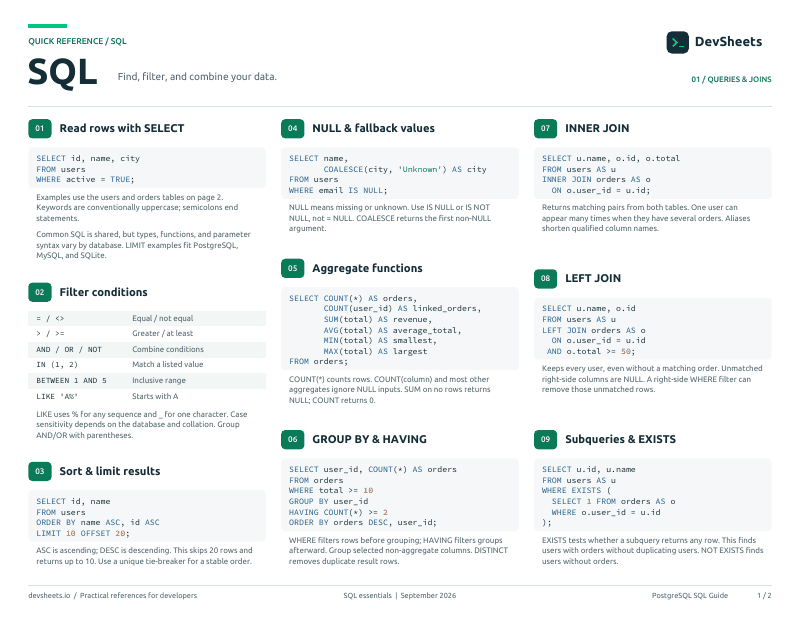
PDF · 2 pages
SQL PDF cheat sheet
A two-page SQL reference for printing or offline use.
SELECT & Filtering
Query data with SELECT, WHERE, LIKE, ORDER BY, and LIMIT.
Retrieve data with filtering, sorting, and limiting.
-- Select all columns
SELECT * FROM users;

-- Select specific columns
SELECT name, email FROM users;

-- WHERE filtering
SELECT * FROM users WHERE age > 18;
SELECT * FROM users WHERE city IN ('NYC', 'LA');
SELECT * FROM users WHERE age BETWEEN 25 AND 35;

-- Sorting
SELECT * FROM users ORDER BY name ASC;
SELECT * FROM users ORDER BY age DESC, name ASC;Filter text with wildcard patterns.
-- % matches any number of characters
SELECT * FROM users WHERE name LIKE 'J%';       -- Starts with J
SELECT * FROM users WHERE email LIKE '%@gmail%'; -- Contains @gmail

-- _ matches exactly one character
SELECT * FROM users WHERE name LIKE '_ohn';      -- ?ohn

-- NOT LIKE
SELECT * FROM users WHERE name NOT LIKE '%test%';Data Modification
Insert, update, and delete data.
Add, modify, and remove rows.
-- INSERT single row
INSERT INTO users (name, email, age)
VALUES ('Alice', 'alice@email.com', 30);

-- INSERT multiple rows
INSERT INTO users (name, email) VALUES
  ('Bob', 'bob@email.com'),
  ('Carol', 'carol@email.com');

-- UPDATE
UPDATE users SET age = 31 WHERE id = 1;

-- DELETE
DELETE FROM users WHERE id = 5;Joins
Combine rows from multiple tables with JOIN operations.
Inner, outer, self, and cross joins.
-- INNER JOIN — matching rows in both tables
SELECT u.name, o.total
FROM users u
INNER JOIN orders o ON u.id = o.user_id;

-- LEFT JOIN — all left rows + matching right
SELECT u.name, o.total
FROM users u
LEFT JOIN orders o ON u.id = o.user_id;

-- RIGHT JOIN — all right rows + matching left
-- FULL OUTER JOIN — all rows from both tablesCombine result sets from multiple queries.
-- UNION — combine and remove duplicates
SELECT name, email FROM customers
UNION
SELECT name, email FROM suppliers;

-- UNION ALL — combine and keep duplicates (faster)
SELECT city FROM users
UNION ALL
SELECT city FROM offices;Aggregation
Aggregate functions with GROUP BY and HAVING.
Summarize data with aggregate functions and grouping.
-- Aggregate functions
SELECT COUNT(*) FROM users;
SELECT SUM(amount) FROM orders;
SELECT AVG(age) FROM users;
SELECT MIN(price), MAX(price) FROM products;

-- GROUP BY
SELECT city, COUNT(*) AS user_count
FROM users
GROUP BY city;

-- HAVING — filter groups
SELECT city, COUNT(*) AS cnt
FROM users
GROUP BY city
HAVING COUNT(*) > 10;CASE & NULL Handling
Conditional logic and NULL-safe operations.
Add conditional logic (if/else) to queries.
-- CASE WHEN
SELECT name,
  CASE
    WHEN age < 18 THEN 'Minor'
    WHEN age < 65 THEN 'Adult'
    ELSE 'Senior'
  END AS age_group
FROM users;

-- Simple CASE
SELECT name,
  CASE status
    WHEN 'A' THEN 'Active'
    WHEN 'I' THEN 'Inactive'
    ELSE 'Unknown'
  END AS status_label
FROM users;Check, replace, and handle NULL values safely.
-- Check for NULL
SELECT * FROM users WHERE phone IS NULL;
SELECT * FROM users WHERE phone IS NOT NULL;

-- COALESCE — first non-NULL value
SELECT COALESCE(nickname, first_name, 'Unknown') AS display_name
FROM users;

-- NULLIF — returns NULL if values are equal
SELECT NULLIF(discount, 0) FROM products;Built-in Functions
String, date, and numeric functions.
Manipulate and transform text data.
SELECT UPPER('hello');               -- HELLO
SELECT LOWER('HELLO');               -- hello
SELECT LENGTH('hello');              -- 5
SELECT TRIM('  hello  ');            -- hello
SELECT CONCAT(first_name, ' ', last_name) AS full_name FROM users;
SELECT SUBSTRING(name, 1, 3) FROM users;  -- First 3 chars
SELECT REPLACE(email, '@old.com', '@new.com') FROM users;Work with dates, times, and numbers.
-- Current date/time
SELECT NOW();                    -- Current timestamp
SELECT CURRENT_DATE;             -- Current date
SELECT CURRENT_TIMESTAMP;        -- ANSI standard

-- Extract parts
SELECT EXTRACT(YEAR FROM created_at) FROM orders;
SELECT EXTRACT(MONTH FROM created_at) FROM orders;

-- Date arithmetic
SELECT created_at + INTERVAL '30 days' FROM orders;Subqueries & CTEs
Nest queries and organize complex logic with Common Table Expressions.
Write nested queries and reusable named expressions.
-- Subquery in WHERE
SELECT * FROM products
WHERE price > (SELECT AVG(price) FROM products);

-- EXISTS
SELECT * FROM customers c
WHERE EXISTS (
  SELECT 1 FROM orders o WHERE o.customer_id = c.id
);

-- CTE (Common Table Expression)
WITH active_users AS (
  SELECT * FROM users WHERE status = 'active'
)
SELECT * FROM active_users WHERE age > 25;Window Functions
Perform calculations across related rows without collapsing groups.
ROW_NUMBER, RANK, LAG, LEAD, running totals, and partitioned aggregates.
-- ROW_NUMBER
SELECT name, salary,
  ROW_NUMBER() OVER (ORDER BY salary DESC) AS rank
FROM employees;

-- RANK with PARTITION BY
SELECT name, department, salary,
  RANK() OVER (PARTITION BY department ORDER BY salary DESC) AS dept_rank
FROM employees;

-- Running total
SELECT date, amount,
  SUM(amount) OVER (ORDER BY date) AS running_total
FROM payments;Table Management
Create, alter, and drop tables with proper data types.
Define tables with CREATE, ALTER, DROP and choose the right data types.
-- CREATE TABLE
CREATE TABLE users (
  id INT PRIMARY KEY AUTO_INCREMENT,
  name VARCHAR(100) NOT NULL,
  email VARCHAR(255) UNIQUE,
  age INT CHECK (age >= 0),
  created_at TIMESTAMP DEFAULT CURRENT_TIMESTAMP
);

-- ALTER TABLE
ALTER TABLE users ADD COLUMN phone VARCHAR(20);
ALTER TABLE users DROP COLUMN phone;
ALTER TABLE users RENAME COLUMN name TO full_name;

-- DROP TABLE
DROP TABLE IF EXISTS temp_data;Constraints & Keys
Enforce data integrity with primary keys, foreign keys, and constraints.
PRIMARY KEY, FOREIGN KEY, UNIQUE, NOT NULL, CHECK, and DEFAULT.
-- Primary key
CREATE TABLE users (
  id INT PRIMARY KEY,
  email VARCHAR(255) UNIQUE NOT NULL
);

-- Foreign key
CREATE TABLE orders (
  id INT PRIMARY KEY,
  user_id INT,
  FOREIGN KEY (user_id) REFERENCES users(id)
    ON DELETE CASCADE
);

-- Add constraint to existing table
ALTER TABLE users ADD CONSTRAINT age_check CHECK (age >= 0);Indexes & Performance
Create indexes to speed up queries.
Create and manage indexes for query performance.
-- Create index
CREATE INDEX idx_users_email ON users(email);

-- Composite index
CREATE INDEX idx_users_name_age ON users(name, age);

-- Unique index
CREATE UNIQUE INDEX idx_users_username ON users(username);

-- Drop index
DROP INDEX idx_users_email;Transactions
Group operations into atomic units with COMMIT and ROLLBACK.
BEGIN, COMMIT, ROLLBACK, and savepoints.
BEGIN TRANSACTION;

UPDATE accounts SET balance = balance - 100 WHERE id = 1;
UPDATE accounts SET balance = balance + 100 WHERE id = 2;

COMMIT;
-- or ROLLBACK; to undoViews & Stored Procedures
Create reusable views and stored procedures.
Save queries as reusable virtual tables.
-- Create view
CREATE VIEW active_users AS
SELECT id, name, email
FROM users WHERE status = 'active';

-- Use it like a table
SELECT * FROM active_users WHERE age > 25;

-- Replace existing view
CREATE OR REPLACE VIEW user_summary AS
SELECT u.name, COUNT(o.id) AS order_count
FROM users u
LEFT JOIN orders o ON u.id = o.user_id
GROUP BY u.id, u.name;

-- Drop view
DROP VIEW IF EXISTS active_users;Save reusable blocks of SQL logic on the database server.
-- Create procedure (MySQL)
DELIMITER //
CREATE PROCEDURE get_user_orders(IN p_user_id INT)
BEGIN
  SELECT * FROM orders WHERE user_id = p_user_id;
END //
DELIMITER ;

-- Call it
CALL get_user_orders(42);