 Swiftv6INTERMEDIATE
Swift
Swift cheat sheet with syntax, optionals, protocols, closures, concurrency, and iOS/macOS development patterns with code examples.
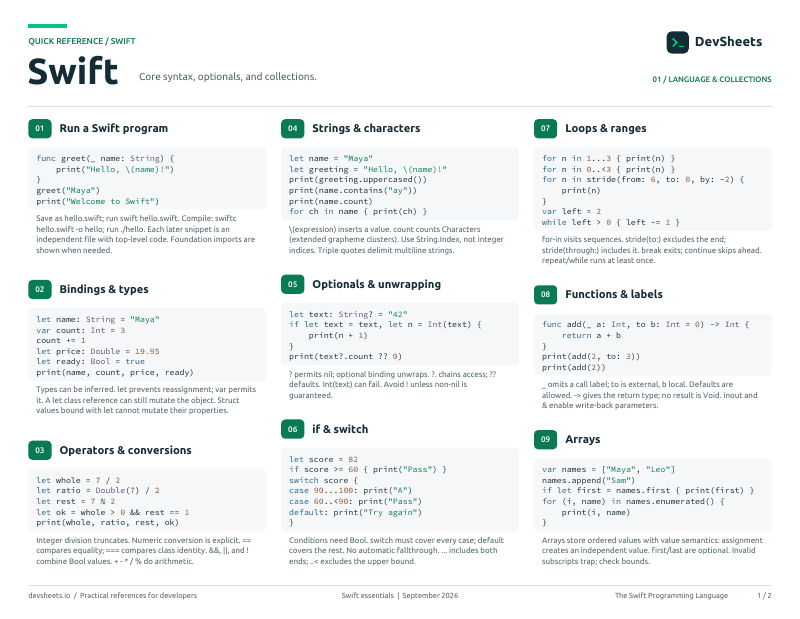
PDF · 2 pages
Swift PDF cheat sheet
A two-page Swift reference for printing or offline use.
Setup
Install the Swift 6 toolchain and run a Swift Package Manager project.
Install Swift, verify the compiler, and run an executable package.
# macOS
xcode-select --install
swift --versionGetting Started
Swift basics and setup
Declaration and initialization
var mutableVariable = "Can change"
let immutableConstant = "Cannot change"

// Type annotations
var explicitString: String = "Hello"
let explicitInt: Int = 42

// Type inference
let inferredBool = true // BoolSwift fundamental data types
// Numbers
let integer: Int = 42
let double: Double = 3.14159
let float: Float = 3.14

// Strings and Characters
let string: String = "Hello, Swift"
let character: Character = "A"
let multiline = """
    This is a
    multiline string
    """

// Booleans
let isTrue: Bool = true
let isFalse = false

// Tuples
let coordinates = (x: 10, y: 20)
let (x, y) = coordinatesOptionals
Handling nil values safely
Declaration and unwrapping
// Optional declaration
var optionalString: String? = "Hello"
var nilValue: String? = nil

// Force unwrapping (dangerous!)
let forced = optionalString!  // Crashes if nil

// Optional binding (safe)
if let unwrapped = optionalString {
    print(unwrapped)  // Safe to use
}

// Guard statement
func processValue(_ value: String?) {
    guard let unwrapped = value else {
        return  // Early exit if nil
    }
    // Use unwrapped safely here
}

// Nil coalescing
let defaultValue = optionalString ?? "Default"Collections
Arrays, Sets, and Dictionaries
Ordered collections of values
// Array creation
var numbers = [1, 2, 3, 4, 5]
var emptyArray: [String] = []
var anotherEmpty = [String]()

// Array operations
numbers.append(6)
numbers.insert(0, at: 0)
numbers.remove(at: 2)
let first = numbers.first  // Optional
let last = numbers.last    // Optional

// Array methods
let doubled = numbers.map { $0 * 2 }
let evens = numbers.filter { $0 % 2 == 0 }
let sum = numbers.reduce(0, +)Key-value pair collections
// Dictionary creation
var scores: [String: Int] = ["Alice": 95, "Bob": 87]
var emptyDict: [String: String] = [:]

// Dictionary operations
scores["Charlie"] = 92  // Add/update
scores.removeValue(forKey: "Bob")
let aliceScore = scores["Alice"]  // Optional Int?

// Dictionary methods
for (name, score) in scores {
    print("\(name): \(score)")
}

let names = Array(scores.keys)
let values = Array(scores.values)

// Default values
let defaultScore = scores["Unknown", default: 0]Functions & Closures
Function definitions and closures
Function declaration and parameters
// Basic function
func greet(name: String) -> String {
    return "Hello, \(name)!"
}

// Multiple parameters and labels
func greet(person: String, from hometown: String) -> String {
    return "Hello \(person) from \(hometown)"
}
greet(person: "Alice", from: "NYC")

// Default parameters
func increment(number: Int, by amount: Int = 1) -> Int {
    return number + amount
}

// Variadic parameters
func sum(numbers: Int...) -> Int {
    return numbers.reduce(0, +)
}Anonymous functions and capturing
// Closure syntax
let simpleClosure = { print("Hello") }
let withParams = { (name: String) in
    print("Hello, \(name)")
}

// Closure with return value
let add: (Int, Int) -> Int = { (a, b) in
    return a + b
}

// Trailing closure syntax
let numbers = [1, 2, 3, 4, 5]
let doubled = numbers.map { $0 * 2 }

// Multiple trailing closures
func loadData(
    onSuccess: () -> Void,
    onFailure: () -> Void
) { }

loadData {
    print("Success")
} onFailure: {
    print("Failed")
}Structs & Classes
Value and reference types
Value types with properties and methods
// Struct definition
struct Point {
    var x: Double
    var y: Double

    // Computed property
    var magnitude: Double {
        return sqrt(x * x + y * y)
    }

    // Method
    func distance(to point: Point) -> Double {
        let dx = x - point.x
        let dy = y - point.y
        return sqrt(dx * dx + dy * dy)
    }

    // Mutating method
    mutating func moveBy(x deltaX: Double, y deltaY: Double) {
        x += deltaX
        y += deltaY
    }
}

// Usage
var point = Point(x: 3, y: 4)
print(point.magnitude)  // 5.0
point.moveBy(x: 1, y: 2)Reference types with inheritance
// Class definition
class Vehicle {
    var currentSpeed = 0.0
    var description: String {
        return "traveling at \(currentSpeed) mph"
    }

    func makeNoise() {
        // Base implementation
    }

    init(speed: Double) {
        self.currentSpeed = speed
    }
}

// Inheritance
class Bicycle: Vehicle {
    var hasBasket = false

    override func makeNoise() {
        print("Ring ring!")
    }
}

// Reference semantics
let bike1 = Bicycle(speed: 15)
let bike2 = bike1  // Same reference
bike2.currentSpeed = 20
print(bike1.currentSpeed) // 20Enums
Enumerations with associated values
Simple and raw value enumerations
// Simple enum
enum Direction {
    case north, south, east, west
}

// Using enums
var heading = Direction.north
heading = .south  // Type inference

// Switch with enum
switch heading {
case .north:
    print("Going north")
case .south:
    print("Going south")
case .east, .west:
    print("Going east or west")
}

// Raw values
enum Planet: Int {
    case mercury = 1, venus, earth, mars
}

let earth = Planet.earth
print(earth.rawValue) // 3Enums with different value types
// Associated values
enum Barcode {
    case upc(Int, Int, Int, Int)
    case qrCode(String)
}

var productBarcode = Barcode.upc(8, 85909, 51226, 3)
productBarcode = .qrCode("ABCDEFGHIJKLMNOP")

// Pattern matching with associated values
switch productBarcode {
case .upc(let system, let manufacturer, let product, let check):
    print("UPC: \(system), \(manufacturer), \(product), \(check)")
case .qrCode(let code):
    print("QR code: \(code)")
}Protocols
Protocol definitions and conformance
Defining and adopting protocols
// Protocol definition
protocol Vehicle {
    var numberOfWheels: Int { get }
    var color: String { get set }

    func start()
    func stop()
}

// Protocol adoption
struct Car: Vehicle {
    let numberOfWheels = 4
    var color: String

    func start() {
        print("Engine started")
    }

    func stop() {
        print("Brakes applied")
    }
}

// Multiple protocols
protocol Named {
    var name: String { get }
}

protocol Aged {
    var age: Int { get }
}

struct Person: Named, Aged {
    let name: String
    let age: Int
}Error Handling
Throwing and catching errors
Defining and throwing errors
// Error definition
enum FileError: Error {
    case notFound
    case permissionDenied
    case corrupted(reason: String)
}

// Throwing function
func readFile(named name: String) throws -> String {
    guard fileExists(name) else {
        throw FileError.notFound
    }
    return "File contents"
}

// Do-catch
do {
    let contents = try readFile(named: "data.txt")
    print(contents)
} catch FileError.notFound {
    print("File not found")
} catch {
    print("Unexpected error: \(error)")
}

// Try? and try!
let contents = try? readFile(named: "data.txt") // Returns optionalConcurrency
Async/await and actors
Modern Swift concurrency
// Async function
func fetchUserData() async -> User {
    // Simulated network call
    try? await Task.sleep(for: .seconds(1))  // 1 second
    return User(name: "John")
}

// Calling async function
Task {
    let user = await fetchUserData()
    print("User: \(user.name)")
}

// Async throwing function
func downloadFile(from url: URL) async throws -> Data {
    let (data, _) = try await URLSession.shared.data(from: url)
    return data
}

// Async let for concurrent execution
async let user = fetchUserData()
async let posts = fetchPosts()
let profile = await Profile(user: user, posts: posts)Thread-safe reference types
// Actor definition
actor BankAccount {
    private var balance: Double = 0

    func deposit(amount: Double) {
        balance += amount
    }

    func withdraw(amount: Double) -> Bool {
        guard balance >= amount else {
            return false
        }
        balance -= amount
        return true
    }

    func getBalance() -> Double {
        return balance
    }
}

// Using actors
let account = BankAccount()

Task {
    await account.deposit(amount: 100)
    let success = await account.withdraw(amount: 50)
    let balance = await account.getBalance()
    print("Balance: \(balance)")
}Extensions
Extending existing types with new functionality
Adding functionality to existing types
// Extending existing types
extension Int {
    var isEven: Bool {
        return self % 2 == 0
    }

    func squared() -> Int {
        return self * self
    }
}

let number = 42
print(number.isEven)  // true
print(number.squared())  // 1764

// Extending with initializers
extension String {
    init(banner str: String, times count: Int) {
        self = String(repeating: str, count: count)
    }
}Extensions with generic constraints
// Extension with constraints
extension Array where Element: Numeric {
    func sum() -> Element {
        return reduce(0, +)
    }

    func average() -> Double {
        return isEmpty ? 0 : Double(sum() as! NSNumber) / Double(count)
    }
}

[1, 2, 3, 4, 5].sum()  // 15
[1.5, 2.5, 3.5].sum()  // 7.5

// Protocol extension with constraints
extension Collection where Element: Equatable {
    func allEqual() -> Bool {
        guard let first = first else { return true }
        return allSatisfy { $0 == first }
    }
}Generics (Advanced)
Generic programming and type constraints
Advanced generic type relationships
// Generic function with multiple constraints
func findDuplicates<T: Hashable & Comparable>(in array: [T]) -> [T] {
    var seen = Set<T>()
    var duplicates = Set<T>()

    for item in array {
        if !seen.insert(item).inserted {
            duplicates.insert(item)
        }
    }

    return duplicates.sorted()
}

// Associated type constraints
protocol DataProvider {
    associatedtype DataType: Codable & Equatable
    func fetchData() -> DataType
}

// Generic class with constraints
class Cache<Key: Hashable, Value> {
    private var storage = [Key: Value]()

    func store(_ value: Value, for key: Key) {
        storage[key] = value
    }

    func retrieve(for key: Key) -> Value? {
        return storage[key]
    }
}Memory Management
ARC, weak/unowned references, and memory optimization
Breaking retain cycles with weak and unowned
// Weak vs Unowned
class Parent {
    let name: String
    var child: Child?

    init(name: String) {
        self.name = name
    }

    deinit {
        print("\(name) parent deallocated")
    }
}

class Child {
    let name: String
    weak var parent: Parent?  // Weak to break cycle

    init(name: String) {
        self.name = name
    }

    deinit {
        print("\(name) child deallocated")
    }
}

// Unowned for non-optional references
class CreditCard {
    let number: String
    unowned let owner: Customer  // Always has owner

    init(number: String, owner: Customer) {
        self.number = number
        self.owner = owner
    }
}Access Control
Controlling visibility and access to code
Five levels of access control
// Access control levels
open class OpenClass {  // Subclassable outside module
    open func openMethod() { }  // Overridable outside module
}

public class PublicClass {  // Accessible outside module
    public func publicMethod() { }  // Not overridable outside
}

internal class InternalClass {  // Default - module only
    func internalMethod() { }  // Default is internal
}

fileprivate class FilePrivateClass {  // Current file only
    fileprivate func filePrivateMethod() { }
}

private class PrivateClass {  // Current scope only
    private func privateMethod() { }
}

// Property access control
public struct PublicStruct {
    public private(set) var readOnlyOutside: Int = 0
    internal var internalProperty: String = ""
    fileprivate var filePrivateProperty: Bool = false
    private var privateProperty: Double = 0.0
}Type Casting
Type checking, casting, and Any/AnyObject
is, as, as?, as! operators
// Type checking with 'is'
let items: [Any] = [1, "hello", 3.14, true]

for item in items {
    if item is Int {
        print("Integer: \(item)")
    } else if item is String {
        print("String: \(item)")
    } else if item is Double {
        print("Double: \(item)")
    }
}

// Downcasting with as? and as!
class Animal {
    var name: String
    init(name: String) {
        self.name = name
    }
}

class Dog: Animal {
    func bark() {
        print("Woof!")
    }
}

class Cat: Animal {
    func meow() {
        print("Meow!")
    }
}

let animals: [Animal] = [Dog(name: "Rex"), Cat(name: "Whiskers")]

for animal in animals {
    if let dog = animal as? Dog {
        dog.bark()
    } else if let cat = animal as? Cat {
        cat.meow()
    }
}Property Wrappers
Encapsulating property storage logic
Custom property wrapper implementation
// Basic property wrapper
@propertyWrapper
struct Capitalized {
    private var value = ""

    var wrappedValue: String {
        get { value }
        set { value = newValue.capitalized }
    }

    init(wrappedValue: String) {
        self.wrappedValue = wrappedValue
    }
}

struct User {
    @Capitalized var firstName: String
    @Capitalized var lastName: String
}

var user = User(firstName: "john", lastName: "doe")
print(user.firstName)  // "John"

// Property wrapper with parameters
@propertyWrapper
struct Clamped<T: Comparable> {
    var value: T
    let min: T
    let max: T

    var wrappedValue: T {
        get { value }
        set { value = Swift.min(Swift.max(newValue, min), max) }
    }

    init(wrappedValue: T, min: T, max: T) {
        self.min = min
        self.max = max
        self.value = Swift.min(Swift.max(wrappedValue, min), max)
    }
}Operators
Custom operators and operator overloading
Defining and implementing custom operators
// Operator overloading
struct Vector2D {
    var x: Double
    var y: Double
}

// Addition operator
extension Vector2D {
    static func + (lhs: Vector2D, rhs: Vector2D) -> Vector2D {
        return Vector2D(x: lhs.x + rhs.x, y: lhs.y + rhs.y)
    }

    static func - (lhs: Vector2D, rhs: Vector2D) -> Vector2D {
        return Vector2D(x: lhs.x - rhs.x, y: lhs.y - rhs.y)
    }

    static func * (vector: Vector2D, scalar: Double) -> Vector2D {
        return Vector2D(x: vector.x * scalar, y: vector.y * scalar)
    }
}

// Compound assignment
extension Vector2D {
    static func += (lhs: inout Vector2D, rhs: Vector2D) {
        lhs = lhs + rhs
    }
}

// Custom operators
prefix operator +++
prefix func +++ (value: inout Int) -> Int {
    value += 2
    return value
}

infix operator **: MultiplicationPrecedence
func ** (base: Double, power: Double) -> Double {
    return pow(base, power)
}Attributes
Swift attributes for compile-time configuration
Built-in Swift attributes
// @available for API availability
@available(iOS 15.0, macOS 12.0, *)
func newFeature() {
    print("This requires iOS 15+")
}

@available(*, deprecated, message: "Use newMethod instead")
func oldMethod() {
    print("This method is deprecated")
}

// @objc for Objective-C interop
@objc class MyClass: NSObject {
    @objc dynamic var name: String = ""

    @objc func doSomething() {
        print("Callable from Objective-C")
    }
}

// @discardableResult
@discardableResult
func configure() -> Bool {
    // Setup code
    return true
}

configure()  // No warning about unused result

// @escaping for closures
func performAsync(completion: @escaping () -> Void) {
    DispatchQueue.main.async {
        completion()
    }
}Initialization
Initialization rules and patterns
Designated, convenience, and failable initializers
// Designated initializer
class Vehicle {
    var wheels: Int
    var maxSpeed: Double

    // Designated initializer
    init(wheels: Int, maxSpeed: Double) {
        self.wheels = wheels
        self.maxSpeed = maxSpeed
    }

    // Convenience initializer
    convenience init(wheels: Int) {
        self.init(wheels: wheels, maxSpeed: 100.0)
    }
}

// Failable initializer
struct Animal {
    let species: String

    init?(species: String) {
        guard !species.isEmpty else {
            return nil
        }
        self.species = species
    }
}

// Required initializer
class BaseClass {
    required init() {
        // Subclasses must implement
    }
}

class SubClass: BaseClass {
    required init() {
        super.init()
    }
}Subscripts
Custom subscript syntax for types
Adding subscript access to custom types
// Basic subscript
struct Matrix {
    let rows: Int, columns: Int
    var grid: [Double]

    init(rows: Int, columns: Int) {
        self.rows = rows
        self.columns = columns
        grid = Array(repeating: 0.0, count: rows * columns)
    }

    subscript(row: Int, column: Int) -> Double {
        get {
            return grid[(row * columns) + column]
        }
        set {
            grid[(row * columns) + column] = newValue
        }
    }
}

var matrix = Matrix(rows: 2, columns: 2)
matrix[0, 0] = 1.0
matrix[1, 1] = 2.0

// Read-only subscript
struct DaysOfWeek {
    let days = ["Sun", "Mon", "Tue", "Wed", "Thu", "Fri", "Sat"]

    subscript(index: Int) -> String {
        return days[index % 7]
    }
}Result Builders
Building DSLs with result builders
Creating domain-specific languages
// Basic result builder
@resultBuilder
struct ArrayBuilder {
    static func buildBlock<T>(_ components: T...) -> [T] {
        return components
    }
}

@ArrayBuilder
func buildNumbers() -> [Int] {
    1
    2
    3
    4
    5
}

// HTML DSL example
@resultBuilder
struct HTMLBuilder {
    static func buildBlock(_ components: String...) -> String {
        components.joined(separator: "\n")
    }

    static func buildOptional(_ component: String?) -> String {
        component ?? ""
    }

    static func buildEither(first: String) -> String {
        first
    }

    static func buildEither(second: String) -> String {
        second
    }
}

func div(@HTMLBuilder content: () -> String) -> String {
    "<div>\n\(content())\n</div>"
}

func p(_ text: String) -> String {
    "<p>\(text)</p>"
}