
JSON logoJSONBEGINNER

JSON

Write, parse, validate, and exchange interoperable JSON using current standards.
12 min read
jsonapiserializationjson-schemadata
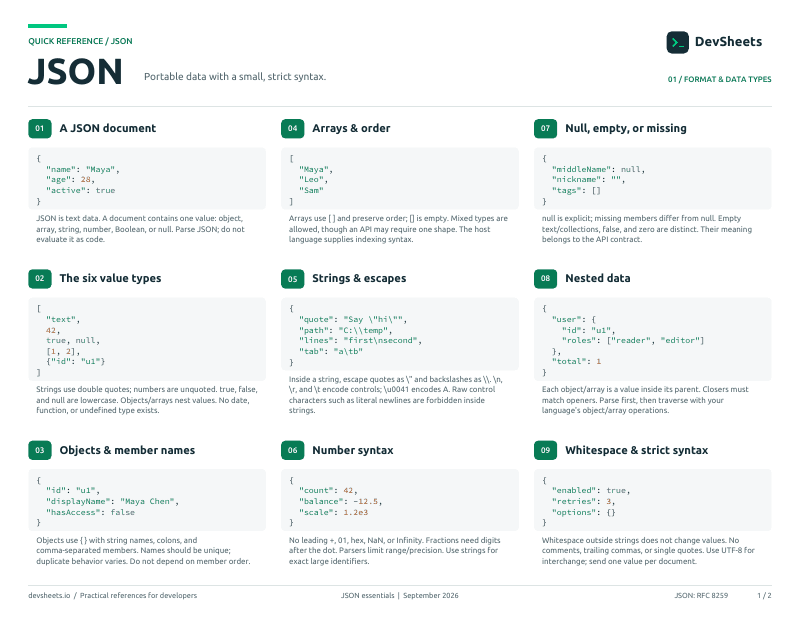
First page of the JSON PDF cheat sheet

PDF · 2 pages

JSON PDF cheat sheet

A two-page JSON reference for printing or offline use.

Open PDF
Loading your progress

Syntax and Values

Use the complete JSON value model and structural grammar.

JSON Values

Represent primitive and structured values.

json
{"name":"Ana","active":true,"score":98,"note":null}
📌 JSON has four primitive and two structured types
📌 Literal names must be lowercase
🔍 Any JSON value can be the root text
⚠️ undefined and NaN are not JSON values
valuestypessyntax

Format JSON without changing its data.

json
{"id":1,"name":"Ana"}
📌 Only space, tab, LF, and CR are whitespace
💡 Indentation improves human readability
⚠️ Trailing commas are invalid JSON
🔍 Whitespace is allowed around structural tokens
whitespaceformattinggrammar

Objects

Store unordered name and value pairs.

Object Members

Create objects with quoted, unique property names.

json
{"name":"Ana","age":30}
📌 Property names must be double-quoted strings
⚠️ Duplicate names have unpredictable behavior
🔍 Object member order is not semantically meaningful
🎯 Use stable, descriptive property names
objectspropertiesnesting

Arrays

Store ordered sequences of JSON values.

Create ordered lists with mixed valid values.

json
["red","green","blue"]
📌 Array order is significant
🔍 Array elements may have different JSON types
💡 Keep API collections structurally consistent
⚠️ Deep nesting increases validation complexity
arraysordernesting

Strings and Unicode

Encode Unicode text and escaped characters correctly.

String Escapes

Escape quotes, slashes, controls, and Unicode.

json
{"message":"She said \"hello\"."}
📌 JSON strings always use double quotes
📌 Control characters must be escaped
💡 UTF-8 can carry Unicode characters directly
🔍 Unicode escapes use four hexadecimal digits
stringsunicodeescaping

Exchange interoperable JSON over networks.

json
Content-Type: application/json
📌 Network JSON must use UTF-8 for interoperability
⚠️ Generators must not add a byte order mark
🔍 application/json has no charset parameter
🎯 Set the media type explicitly in APIs
utf-8httpmedia-type

Numbers and Literals

Use interoperable numbers, booleans, and null.

JSON Numbers

Represent integers, fractions, and exponents.

json
[0,-12,3.14,6.02e23,-2E-3]
📌 Leading zeros are not allowed except for zero
⚠️ Infinity and NaN are invalid JSON
🔍 Number precision depends on the parser
🎯 Send large identifiers as strings when precision matters
numbersprecisionexponents

Represent logical states and missing values.

json
{"enabled":true,"archived":false,"owner":null}
📌 true, false, and null are lowercase
🔍 null is a value, not a missing property
🎯 Define null semantics in API contracts
⚠️ Do not quote booleans unless they are text
booleannullliterals

JavaScript

Parse and serialize JSON safely in JavaScript.

JSON.parse

Convert JSON text to a JavaScript value.

javascript
const data = JSON.parse('{"name":"Ana"}')
📌 JSON.parse does not execute code
💡 A reviver can transform parsed values
⚠️ Catch SyntaxError for untrusted input
🔍 Dates remain strings unless converted
javascriptparsereviver

JSON.stringify

Convert a JavaScript value to JSON text.

javascript
const text = JSON.stringify({ name: 'Ana', active: true })
📌 undefined object properties are omitted
⚠️ BigInt throws unless transformed
💡 The third argument controls indentation
🔍 replacer filters or transforms values
javascriptstringifyreplacer

Python

Decode and encode JSON with the standard library.

loads and dumps

Convert between JSON text and Python values.

python
import json

data = json.loads('{"name":"Ana"}')
text = json.dumps(data)
📌 loads reads text and dumps produces text
💡 ensure_ascii=False preserves readable Unicode
🔍 parse_float can preserve decimal precision
⚠️ default handlers must return serializable values
pythonloadsdumps

JSON Files

Read and write UTF-8 JSON files.

python
with open('data.json', encoding='utf-8') as file:
    data = json.load(file)
📌 load and dump operate on file objects
💡 Specify UTF-8 explicitly
🎯 Add a final newline for text-file tooling
⚠️ Validate data before overwriting files
pythonfilesencoding

JSON Schema

Describe and validate JSON documents with Draft 2020-12.

Object Schema

Validate object properties and required fields.

json
{"$schema":"https://json-schema.org/draft/2020-12/schema","type":"object"}
📌 $schema declares the schema dialect
🔍 properties alone does not require fields
📌 required lists mandatory property names
⚠️ additionalProperties changes extensibility
json-schemaobjectsvalidation

Validate collections and combine reusable rules.

json
{
  "type":"array",
  "items":{"type":"string"},
  "uniqueItems":true
}
📌 items applies a schema to array elements
💡 $defs and $ref reuse schema fragments
🔍 allOf requires every subschema to match
⚠️ oneOf requires exactly one match
json-schemaarrayscomposition

Pointer and Patch

Address values and describe partial document changes.

JSON Pointer

Address a value using RFC 6901 path tokens.

json
/users/0/name
📌 Pointer tokens are separated by /
🔍 Array indexes are decimal tokens
📌 ~1 escapes / and ~0 escapes ~
⚠️ A missing target makes operations fail
json-pointerpathsrfc-6901

JSON Patch

Describe ordered changes with RFC 6902 operations.

json
[ {"op":"replace","path":"/name","value":"Ana"} ]
📌 Patch operations run in array order
💡 test supports optimistic concurrency
🔍 - appends to an array
⚠️ Apply patches only after authorization
json-patchrfc-6902api

Validation and Security

Reject invalid input and avoid interoperability traps.

Recognize syntax accepted by JavaScript but not JSON.

json
Invalid:
{'name':'Ana'}
{"active":True}
{"items":[1,2,]}
📌 JSON is stricter than JavaScript object syntax
⚠️ Comments are not part of RFC 8259
💡 Use a parser instead of visual inspection
🎯 Return useful validation errors without leaking data
validationinvalid-jsonpitfalls

Treat parsed JSON as untrusted structured input.

json
const data = JSON.parse(untrustedText)
validate(data)
⚠️ Never parse JSON with eval
📌 Parsing does not validate business rules
🔍 Parsers may impose size and depth limits
🎯 Validate shape before using values
securitylimitsvalidation