 Bashv5.2INTERMEDIATE
Bash Scripting
Bash scripting reference - variables, quoting, parameter expansion, conditionals, loops, functions, arrays, and safe scripting patterns.
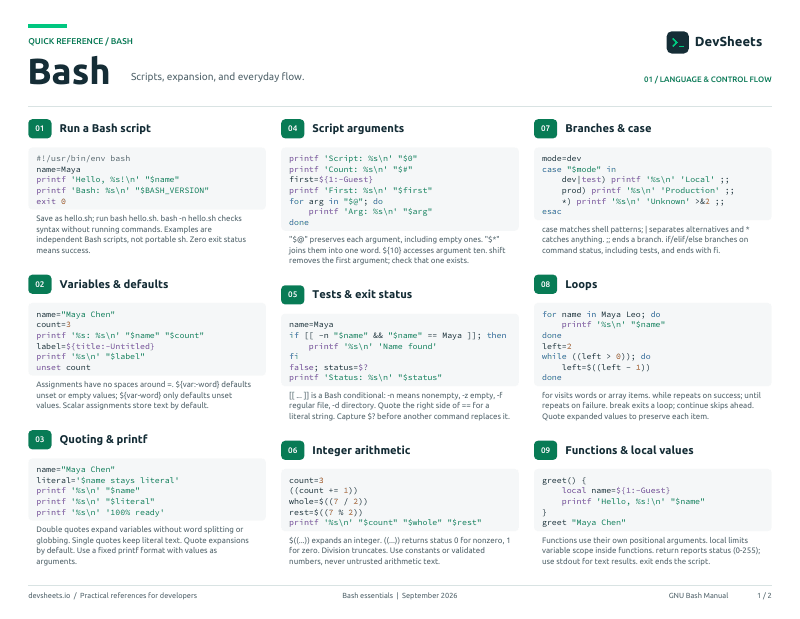
PDF · 2 pages
Bash PDF cheat sheet
A two-page Bash reference for printing or offline use.
Getting Started
Shebang, making scripts executable, and running them.
Create, permit, and run a script.
# Quick Reference
#!/usr/bin/env bash
echo "Hello, World!"

# make it runnable, then run
chmod +x script.sh
./script.shVariables & Quoting
Assigning values and controlling expansion with quotes.
Assignment, usage, and scope.
# Quick Reference
name="Sam"          # NO spaces around =
echo "$name"        # use with $
echo "${name}" # braces for clarity/adjacencySingle vs double quotes and why quoting matters.
# Quick Reference
echo "$var"       # double: expands variables
echo '$var'       # single: literal, no expansion
echo "${arr[@]}" # always quote expansionsParameters & Special Variables
Script arguments and built-in variables.
Access arguments and shell state.
# Quick Reference
$0   # script name
$1 $2 ...   # positional args
$@   # all args (each quoted)
$#   # arg count
$?   # last exit status
$$ # current PIDSubstitution & Arithmetic
Capturing output and doing math.
$(...) and $((...)).
# Quick Reference
files="$(ls | wc -l)"     # capture command output
sum=$(( 3 + 4 ))          # arithmetic -> 7
(( count++ )) # arithmetic evaluationConditionals
Tests, comparisons, and branching.
if/elif/else with [[ ]].
# Quick Reference
if [[ "$x" == "yes" ]]; then
    echo "ok"
elif [[ -z "$x" ]]; then
    echo "empty"
else
    echo "no"
fiCommon test operators.
# Quick Reference
[[ -f file ]]   # regular file exists
[[ -d dir ]]    # directory exists
[[ -z "$s" ]]   # string is empty
[[ "$a" == "$b" ]] # strings equalcase Statements
Multi-way branching on patterns.
Match a value against patterns.
# Quick Reference
case "$1" in
    start) echo "starting" ;;
    stop)  echo "stopping" ;;
    *)     echo "usage: start|stop" ;;
esacLoops
Iterating with for, while, and until.
Iterate lists, ranges, and globs.
# Quick Reference
for item in a b c; do echo "$item"; done
for i in {1..5}; do echo "$i"; done
for f in *.txt; do echo "$f"; doneCondition-driven loops and reading input.
# Quick Reference
while [[ $n -lt 5 ]]; do (( n++ )); done
until [[ -f ready ]]; do sleep 1; done
while read -r line; do echo "$line"; done < fileFunctions
Reusable blocks with arguments and return values.
Define, pass arguments, and return results.
# Quick Reference
greet() {
    local name="$1"
    echo "Hello, $name"
}
greet "Sam"
result="$(greet "Sam")" # capture the echoed outputArrays
Indexed and associative arrays.
Ordered, zero-based lists.
# Quick Reference
arr=(a b c)
echo "${arr[0]}"      # a
echo "${arr[@]}"      # all elements
echo "${#arr[@]}"     # length -> 3
arr+=(d) # appendKey-value maps (bash 4+).
# Quick Reference
declare -A ages
ages[sam]=30
echo "${ages[sam]}"       # 30
echo "${!ages[@]}" # keysParameter Expansion
Transform variables inline - no external commands.
Fallbacks and slicing.
# Quick Reference
${var:-default}   # use default if unset/empty
${var:=default}   # assign default if unset
${#var}           # length
${var:0:3} # substring (offset, length)Trim prefixes/suffixes and substitute.
# Quick Reference
${file#*/}     # remove shortest leading match
${file##*/}    # remove longest (-> basename)
${file%.*}     # remove shortest trailing (-> drop ext)
${var/old/new} # replace first matchInput & Output
Reading input and writing/redirecting output.
Prompt for and parse user input.
# Quick Reference
read -r -p "Name: " name
read -rsp "Password: " pass    # -s hides input
read -ra parts <<< "a b c" # split into an arrayecho, printf, and streams.
# Quick Reference
echo "text"
printf "%s = %d\n" "x" 42
cmd > out.txt      # stdout to file (overwrite)
cmd >> out.txt     # append
cmd 2> err.txt # stderr to fileHere-docs & Process Substitution
Multi-line input and treating output as files.
Feed blocks of text and command output.
# Quick Reference
cat <<EOF
multi-line
text with $var expanded
EOF

grep foo <<< "$string"          # here-string
diff <(sort a) <(sort b) # process substitutionExit Codes & Error Handling
Fail fast and clean up reliably.
Strict mode and cleanup handlers.
# Quick Reference
set -euo pipefail       # strict mode (put near the top)
trap 'echo "cleanup"' EXIT
trap 'echo "error on line $LINENO"' ERRGlobbing & Brace Expansion
Filename patterns and generated sequences.
Match files and generate strings.
# Quick Reference
*.txt        # any name ending .txt
file?.log    # single-char wildcard
{a,b,c}      # brace expansion -> a b c
{1..5} # sequence -> 1 2 3 4 5Argument Parsing
Handle script options and flags.
Parse single-letter options.
# Quick Reference
while getopts "vo:" opt; do
    case "$opt" in
        v) verbose=1 ;;
        o) out="$OPTARG" ;;
        *) echo "usage..."; exit 1 ;;
    esac
doneDebugging & Best Practices
Find bugs and write robust scripts.
Tracing, linting, and guidelines.
# Quick Reference
bash -x script.sh        # trace every command
set -x                   # trace on
set +x                   # trace off
shellcheck script.sh     # static analysis