 HTMLBEGINNER
HTML
HTML5 cheat sheet covering semantic elements, form controls, media tags, accessibility attributes, and modern markup best practices.
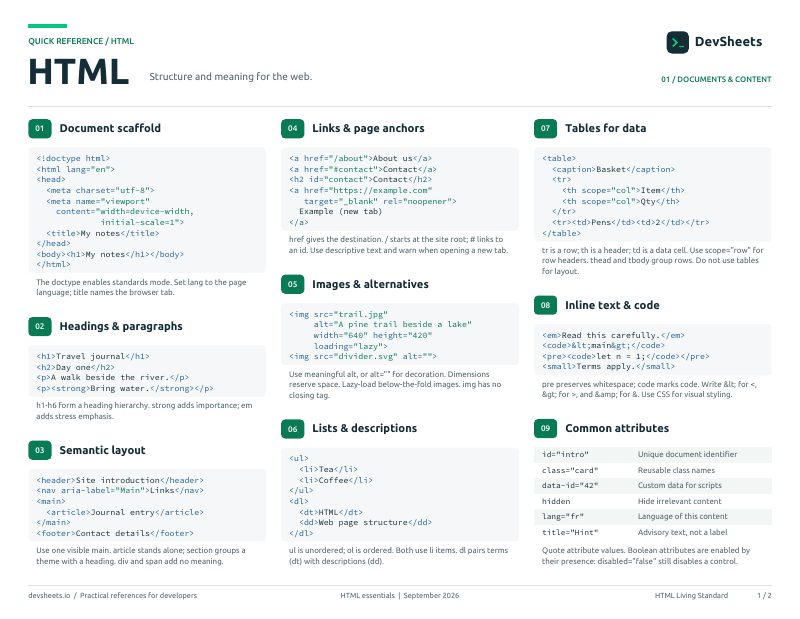
PDF · 2 pages
HTML PDF cheat sheet
A two-page HTML reference for printing or offline use.
Document Structure & Metadata
Essential HTML document structure and metadata tags
Standard HTML5 document structure
<!DOCTYPE html>
<html lang="en">
<head>
  <meta charset="UTF-8">
  <meta name="viewport" content="width=device-width, initial-scale=1.0">
  <meta name="description" content="Page description">
  <title>Page Title</title>
  <link rel="stylesheet" href="styles.css">
</head>
<body>
  <h1>Hello World</h1>
  <script src="script.js"></script>
</body>
</html><!DOCTYPE html>
<html lang="en">
<head>
<meta charset="UTF-8">
<title>My Page</title>
</head>
<body>
<h1>Content</h1>
</body>
</html>Important metadata for SEO and browser behavior
<!-- Character encoding (required) -->
<meta charset="UTF-8">

<!-- Viewport (required for responsive) -->
<meta name="viewport" content="width=device-width, initial-scale=1.0">

<!-- SEO meta tags -->
<meta name="description" content="Page description (150-160 chars)">
<meta name="keywords" content="keyword1, keyword2">
<meta name="robots" content="index, follow">

<!-- Refresh/Redirect -->
<meta http-equiv="refresh" content="5;url=https://example.com">

<!-- Theme color (mobile browsers) -->
<meta name="theme-color" content="#4285f4">Link external resources and define relationships
<!-- Stylesheets -->
<link rel="stylesheet" href="styles.css">
<link rel="stylesheet" href="print.css" media="print">

<!-- Favicon -->
<link rel="icon" href="/favicon.ico">
<link rel="icon" type="image/png" sizes="32x32" href="/favicon-32x32.png">
<link rel="apple-touch-icon" href="/apple-touch-icon.png">

<!-- Preloading resources -->
<link rel="preload" href="font.woff2" as="font" crossorigin>
<link rel="prefetch" href="next-page.html">
<link rel="dns-prefetch" href="https://api.example.com">Semantic HTML5 Elements
Meaningful HTML5 elements for better structure and accessibility
Main structural elements for page layout
<header>
<nav>
<ul>
<li><a href="/">Home</a></li>
<li><a href="/about">About</a></li>
</ul>
</nav>
</header>
<main>
<article>
<h1>Article Title</h1>
<p>Content...</p>
</article>
<aside>
<h2>Related Links</h2>
<ul>...</ul>
</aside>
</main>
<footer>
<p>© 2024 Company Name</p>
</footer><body>
<header>Site Header</header>
<nav>Navigation</nav>
<main>
<article>Main Content</article>
<aside>Sidebar</aside>
</main>
<footer>Site Footer</footer>
</body>Organize content with semantic section elements
<!-- Article - independent content -->
<article>
  <h2>Blog Post Title</h2>
  <p>This is a complete, independent piece of content...</p>
</article>

<!-- Section - thematic grouping -->
<section>
  <h2>Chapter 1</h2>
  <p>Section content...</p>
</section>

<!-- Figure with caption -->
<figure>
  <img src="chart.png" alt="Sales chart">
  <figcaption>Q4 2024 Sales Results</figcaption>
</figure>

<!-- Details/Summary (collapsible) -->
<details>
  <summary>Click to expand</summary>
  <p>Hidden content here...</p>
</details><article>
<h2>Article</h2>
<section>
<h3>Section 1</h3>
<figure>
<img src="img.jpg" alt="Description">
<figcaption>Image caption</figcaption>
</figure>
</section>
<section>
<h3>Section 2</h3>
<details>
<summary>More info</summary>
<p>Expandable content</p>
</details>
</section>
</article>Text & Content Elements
Headings, paragraphs, and text formatting elements
Basic text elements and hierarchy
<!-- Headings (h1-h6) -->
<h1>Main Page Title</h1>
<h2>Section Heading</h2>
<h3>Subsection</h3>
<h4>Sub-subsection</h4>
<h5>Minor Heading</h5>
<h6>Smallest Heading</h6>

<!-- Paragraphs and line breaks -->
<p>This is a paragraph of text.</p>
<p>Another paragraph with a<br>line break.</p>

<!-- Text formatting -->
<strong>Bold/Important text</strong>
<em>Italic/Emphasized text</em>
<mark>Highlighted text</mark>
<small>Small print</small>
<del>Deleted text</del>
<ins>Inserted text</ins>
<sub>Subscript</sub>
<sup>Superscript</sup><h1>Main Title</h1>
<p>This is <strong>bold</strong> and <em>italic</em> text.</p>
<p>H<sub>2</sub>O and x<sup>2</sup></p>
<p><mark>Highlighted</mark> and <del>deleted</del> text.</p>Ordered, unordered, and description lists
<!-- Unordered list -->
<ul>
  <li>First item</li>
  <li>Second item</li>
  <li>Third item</li>
</ul>

<!-- Ordered list -->
<ol>
  <li>Step one</li>
  <li>Step two</li>
  <li>Step three</li>
</ol>

<!-- Description list -->
<dl>
  <dt>HTML</dt>
  <dd>HyperText Markup Language</dd>
  <dt>CSS</dt>
  <dd>Cascading Style Sheets</dd>
</dl><ul>
<li>Unordered item</li>
</ul>
<ol>
<li>Ordered item</li>
</ol>
<dl>
<dt>Term</dt>
<dd>Definition</dd>
</dl>Hyperlinks and navigation elements
<!-- Basic links -->
<a href="https://example.com">External link</a>
<a href="/about">Internal link</a>
<a href="#section">Anchor link</a>
<a href="mailto:email@example.com">Email link</a>
<a href="tel:+1234567890">Phone link</a>

<!-- Link attributes -->
<a href="https://example.com" target="_blank" rel="noopener">Open in new tab</a>
<a href="document.pdf" download>Download PDF</a>

<!-- Navigation -->
<nav aria-label="Main navigation">
  <ul>
    <li><a href="/">Home</a></li>
    <li><a href="/products">Products</a></li>
    <li><a href="/contact">Contact</a></li>
  </ul>
</nav><nav>
<a href="/">Home</a> |
<a href="/about">About</a> |
<a href="/contact">Contact</a>
</nav>Semantic wrappers for images, quotes, and meaningful inline text
<!-- Figure with caption -->
<figure>
  <img src="chart.png" alt="Sales chart">
  <figcaption>Q4 2024 sales performance</figcaption>
</figure>

<!-- Blockquote -->
<blockquote cite="https://example.com">
  <p>The only way to do great work is to love what you do.</p>
  <cite>Steve Jobs</cite>
</blockquote>Forms & Input Elements
Form controls and input types for user interaction
Essential form controls and structure
<!-- Basic form structure -->
<form action="/submit" method="POST">
  <label for="name">Name:</label>
  <input type="text" id="name" name="name" required>

  <label for="email">Email:</label>
  <input type="email" id="email" name="email" required>

  <label for="message">Message:</label>
  <textarea id="message" name="message" rows="4"></textarea>

  <button type="submit">Submit</button>
</form>

<!-- Input types -->
<input type="text" placeholder="Enter text">
<input type="password" placeholder="Password">
<input type="email" placeholder="email@example.com">
<input type="number" min="0" max="100">
<input type="checkbox" id="agree"> <label for="agree">I agree</label>
<input type="radio" name="choice" value="yes"> Yes
<input type="radio" name="choice" value="no"> No<form>
<input type="text" placeholder="Name">
<input type="email" placeholder="Email">
<select>
<option>Option 1</option>
<option>Option 2</option>
</select>
<textarea placeholder="Message"></textarea>
<button type="submit">Submit</button>
</form>Modern input types with built-in validation
<!-- Date and time inputs -->
<input type="date" name="birthday">
<input type="time" name="appointment">
<input type="datetime-local" name="meeting">
<input type="month" name="expiry">
<input type="week" name="week">

<!-- Numeric inputs -->
<input type="number" min="0" max="100" step="5">
<input type="range" min="0" max="100" value="50">

<!-- Contact inputs -->
<input type="email" multiple>
<input type="tel" pattern="[0-9]{3}-[0-9]{3}-[0-9]{4}">
<input type="url" placeholder="https://example.com">

<!-- Other inputs -->
<input type="search" placeholder="Search...">
<input type="color" value="#ff0000">
<input type="file" accept="image/*" multiple><form>
<input type="date" value="2024-01-01">
<input type="time" value="14:30">
<input type="color" value="#4285f4">
<input type="range" min="0" max="100">
<input type="file" accept=".pdf,.doc">
</form>Group form fields, add autocomplete suggestions, and show progress indicators
<!-- Fieldset groups related controls -->
<fieldset>
  <legend>Shipping Address</legend>
  <label>Street: <input type="text" name="street"></label>
  <label>City: <input type="text" name="city"></label>
</fieldset>

<!-- Datalist autocomplete -->
<input list="browsers" name="browser">
<datalist id="browsers">
  <option value="Chrome">
  <option value="Firefox">
  <option value="Safari">
</datalist>Important attributes for form controls
<!-- Input attributes: required (must fill), disabled (cannot edit), readonly (select not edit), autofocus (focus on load), autocomplete, pattern (regex validation) -->
<input type="text"
  required
  disabled
  readonly
  autofocus
  autocomplete="on"
  placeholder="Hint text"
  pattern="[A-Z]{3}"
  title="Three uppercase letters">

<!-- Form attributes: action (where to send), method (GET/POST), enctype (multipart for file uploads), autocomplete, novalidate (skip HTML5 validation) -->
<form
  action="/submit"
  method="POST"
  enctype="multipart/form-data"
  autocomplete="off"
  novalidate>

<!-- Button types -->
<button type="submit">Submit Form</button>
<button type="reset">Clear Form</button>
<button type="button">Just a Button</button>Media & Graphics
Images, video, audio, and graphics elements
Responsive and accessible image elements
<!-- Basic image -->
<img src="photo.jpg" alt="Description of image">

<!-- Responsive image -->
<img src="photo.jpg"
     alt="Description"
     width="800"
     height="600"
     loading="lazy">

<!-- Picture element for art direction -->
<picture>
  <source media="(min-width: 768px)" srcset="large.jpg">
  <source media="(min-width: 480px)" srcset="medium.jpg">
  <img src="small.jpg" alt="Responsive image">
</picture>

<!-- Responsive images with srcset -->
<img srcset="small.jpg 480w,
            medium.jpg 768w,
            large.jpg 1200w"
     sizes="(max-width: 480px) 100vw,
            (max-width: 768px) 50vw,
            33vw"
     src="medium.jpg"
alt="Responsive image"><figure>
<img src="photo.jpg" alt="A beautiful sunset">
<figcaption>Sunset over the mountains</figcaption>
</figure>Multimedia elements with controls
<!-- Video element -->
<video controls width="640" height="360" poster="thumbnail.jpg">
  <source src="video.webm" type="video/webm">
  <source src="video.mp4" type="video/mp4">
  <p>Your browser doesn't support HTML5 video.</p>
</video>

<!-- Audio element -->
<audio controls>
  <source src="audio.ogg" type="audio/ogg">
  <source src="audio.mp3" type="audio/mpeg">
  <p>Your browser doesn't support HTML5 audio.</p>
</audio>

<!-- Video with attributes: controls, autoplay, muted (required for autoplay), loop, preload=none|metadata|auto -->
<video controls autoplay muted loop preload="metadata">
  <source src="video.mp4" type="video/mp4">
</video><video controls width="320" height="240">
<source src="movie.mp4" type="video/mp4">
<track kind="subtitles" src="subs.vtt" srclang="en" label="English">
Your browser doesn't support video.
</video>Serve optimized images for different screen sizes with picture, source, and srcset
<!-- srcset for different resolutions -->
<img
  src="photo-800.jpg"
  srcset="photo-400.jpg 400w, photo-800.jpg 800w, photo-1200.jpg 1200w"
  sizes="(max-width: 600px) 400px, 800px"
  alt="Product photo"
  loading="lazy"
>

<!-- Picture for art direction -->
<picture>
  <source media="(max-width: 600px)" srcset="mobile.jpg">
  <source media="(max-width: 1200px)" srcset="tablet.jpg">
  <img src="desktop.jpg" alt="Hero image">
</picture>Graphics and drawing elements
<!-- Canvas for JavaScript drawing -->
<canvas id="myCanvas" width="400" height="300">
  Your browser doesn't support canvas.
</canvas>

<script>
  const canvas = document.getElementById('myCanvas');
  const ctx = canvas.getContext('2d');
  ctx.fillStyle = 'blue';
  ctx.fillRect(10, 10, 100, 100);
</script>

<!-- Inline SVG -->
<svg width="200" height="200" xmlns="http://www.w3.org/2000/svg">
  <circle cx="100" cy="100" r="80" fill="green" />
  <text x="100" y="100" text-anchor="middle" fill="white">SVG</text>
</svg>

<!-- SVG as image -->
<img src="graphic.svg" alt="SVG graphic"><canvas id="canvas" width="200" height="100"></canvas>
<svg width="100" height="100">
<rect x="10" y="10" width="80" height="80" fill="red"/>
</svg>Tables
Structured tabular data presentation
Complete table with semantic elements
<!-- Basic table -->
<table>
  <thead>
    <tr>
      <th>Name</th>
      <th>Age</th>
      <th>City</th>
    </tr>
  </thead>
  <tbody>
    <tr>
      <td>John</td>
      <td>30</td>
      <td>New York</td>
    </tr>
    <tr>
      <td>Jane</td>
      <td>25</td>
      <td>London</td>
    </tr>
  </tbody>
</table><table border="1">
<caption>User Data</caption>
<thead>
<tr>
<th>Header 1</th>
<th>Header 2</th>
</tr>
</thead>
<tbody>
<tr>
<td>Data 1</td>
<td>Data 2</td>
</tr>
</tbody>
<tfoot>
<tr>
<td colspan="2">Footer</td>
</tr>
</tfoot>
</table>Interactive & Web Components
Modern interactive HTML elements
Dialog, details, and other interactive elements
<!-- Details/Summary (accordion) -->
<details>
  <summary>Click to expand</summary>
  <p>This content is hidden by default and revealed when clicked.</p>
</details>

<!-- Dialog (modal) -->
<dialog id="myDialog">
  <h2>Dialog Title</h2>
  <p>Dialog content goes here.</p>
  <button onclick="this.closest('dialog').close()">Close</button>
</dialog>
<button onclick="document.getElementById('myDialog').showModal()">
  Open Dialog
</button>

<!-- Progress and meter -->
<progress value="70" max="100">70%</progress>
<meter value="6" min="0" max="10" low="3" high="7" optimum="9">
  6 out of 10
</meter><details open>
<summary>Expanded by default</summary>
<p>Content visible on load</p>
</details>
<dialog open>
<p>Visible dialog</p>
<button>Close</button>
</dialog>
<progress value="50" max="100"></progress>
<meter value="0.6">60%</meter>Native modal and non-modal dialogs without JavaScript libraries
<!-- Modal dialog -->
<dialog id="confirm-dialog">
  <h2>Confirm Action</h2>
  <p>Are you sure you want to proceed?</p>
  <form method="dialog">
    <button value="cancel">Cancel</button>
    <button value="confirm">Confirm</button>
  </form>
</dialog>

<button onclick="document.getElementById('confirm-dialog').showModal()">
  Open Modal
</button>Reusable HTML templates and Web Component building blocks
<!-- Template (not rendered until cloned) -->
<template id="card-template">
  <div class="card">
    <h2 class="card-title"></h2>
    <p class="card-body"></p>
  </div>
</template>

<script>
  const template = document.getElementById('card-template');
  const clone = template.content.cloneNode(true);
  clone.querySelector('.card-title').textContent = 'Hello';
  document.body.appendChild(clone);
</script>Accessibility
Make HTML accessible with ARIA attributes and semantic best practices
Essential ARIA attributes and semantic patterns for accessible web pages
<!-- Label elements properly -->
<label for="email">Email:</label>
<input type="email" id="email" aria-required="true">

<!-- Describe with ARIA -->
<button aria-label="Close dialog">×</button>

<!-- Hide decorative content -->
<img src="divider.png" alt="" aria-hidden="true">

<!-- Live regions for dynamic updates -->
<div role="alert">Form submitted successfully!</div>Common attributes that work on any HTML element
<div id="unique-id">Unique identifier</div>
<div class="card highlighted">CSS classes</div>
<div data-user-id="123" data-role="admin">Custom data</div>
<div hidden>Not displayed</div>
<div contenteditable="true">Editable text</div>
<div draggable="true">Drag me</div>